 Skip to content
Short answer: Microsoft 365 vs Office 2024 is subscription vs one-time purchase. Office 2024 (Office Home 2024 costs $179.99 in the US) gives you Word, Excel, PowerPoint and OneNote on one PC or Mac, with security updates until October 2029 but no new features. Microsoft 365 Personal ($99.99 a year) gives you the latest apps on up to five devices at once, 1 TB of OneDrive storage, Copilot and ongoing support, for as long as you pay.
This guide compares Microsoft 365 and Office 2024 in plain words: what you get, what it costs over time, and who should choose which. It is based on Microsoft’s plan comparison, Microsoft Support and the Office 2024 lifecycle page, checked in October 2026.
- Office 2024: pay once, one PC or Mac, no new features
- Microsoft 365: pay yearly or monthly, always the latest version
- Devices: 1 computer vs 5 signed in at once
- Storage: 5 GB free OneDrive vs 1 TB
- Support ends: Office 2024 on 9 October 2029
Table of Contents
Microsoft 365 vs Office 2024 at a glance
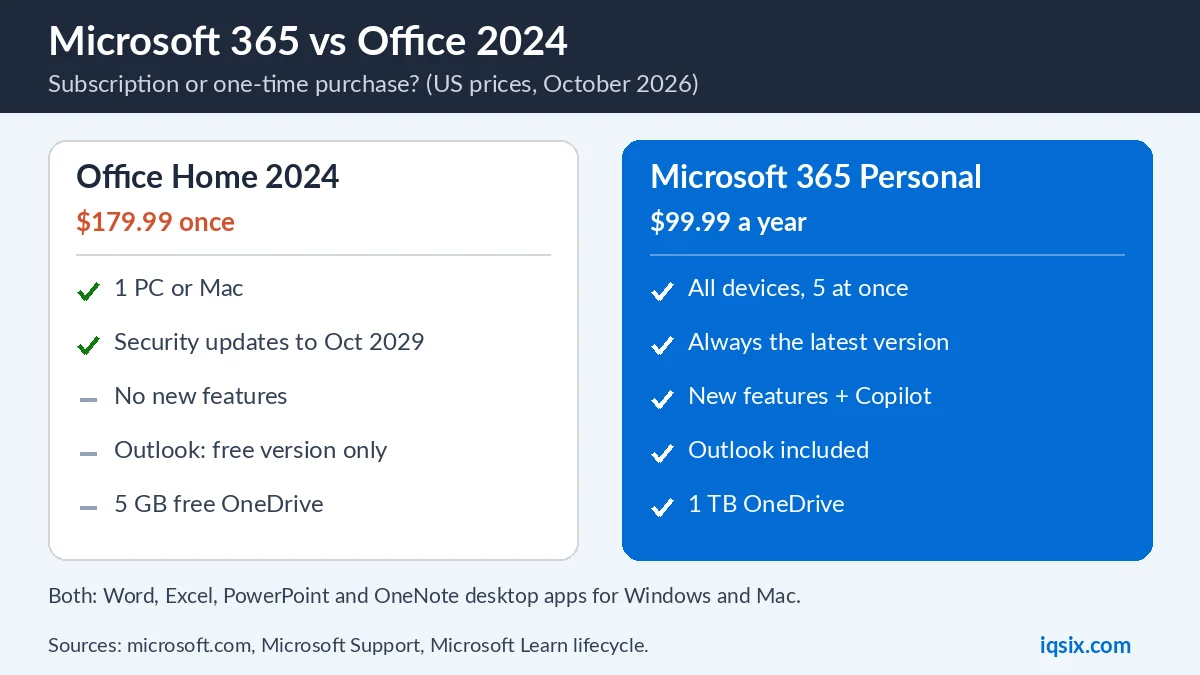
Here is how Office Home 2024 compares with Microsoft 365 Personal, using Microsoft’s US prices:
| Office Home 2024 | Microsoft 365 Personal | |
|---|---|---|
| Price | $179.99 once | $99.99 a year |
| Computers | 1 PC or Mac | All your devices, 5 at once |
| New features | No | Yes, always |
| Outlook | Free version (ads) | Included |
| OneDrive | 5 GB free | 1 TB |
| Copilot (AI) | Free version | Included |
Both include Word, Excel, PowerPoint and OneNote as desktop apps. The difference is how you pay, how many devices you can use, and whether you get new features and cloud storage.
What is Office 2024?
Office 2024 is the one-time purchase version of Microsoft’s Office apps. Microsoft says you pay a single, up-front cost to get the apps for one computer, a PC or a Mac (Microsoft Support). There are two editions:
- Office Home 2024 ($179.99 in the US): Word, Excel, PowerPoint and OneNote.
- Office Home & Business 2024: the same apps plus the classic desktop Outlook app.
Office 2024 gets security updates, but no new features. Upgrades to the next major version are not included: when a new version comes out, you have to buy it at full price.
What is Microsoft 365?
Microsoft 365 is a subscription. As long as it is active, you get the latest versions of Word, Excel, PowerPoint, Outlook and OneNote for Windows and Mac, plus Access on PCs. You get new features, security updates and bug fixes automatically.
Microsoft 365 Personal costs $99.99 a year or $9.99 a month in the US, for one person. It includes 1 TB of OneDrive storage, Copilot in the apps, Microsoft Defender security and Teams. If several people need it, Microsoft 365 Family covers up to six: see our Microsoft 365 Personal vs Family comparison.
Cost over time: which is cheaper?

Office 2024 costs more on day one, but you only pay once. Microsoft 365 costs less at the start, but you pay every year. Here is the total cost over time, using US prices:
| Years | Office Home 2024 | Microsoft 365 Personal |
|---|---|---|
| 1 year | $179.99 | $99.99 |
| 2 years | $179.99 | $199.98 |
| 3 years | $179.99 | $299.97 |
| 5 years | $179.99 | $499.95 |
After about two years, Microsoft 365 Personal costs more than Office Home 2024. But for that money you also get 1 TB of storage, Outlook, Copilot, five devices at once and every new version. If you only need Word and Excel on one computer, Office 2024 is the cheaper choice over several years.
Office 2024 support ends in October 2029
Microsoft’s lifecycle page lists Office 2024 with a start date of 1 October 2024 and a retirement date of 9 October 2029, for both Home and Home & Business on Windows and Mac (Microsoft Learn). After that date, Office 2024 gets no more security updates.
Older versions are already out of support. Office 2021 support ended on 13 October 2026, so if you still use Office 2021 it no longer gets security fixes. Microsoft 365 has no fixed end date: as long as your subscription is active, you get the latest version. It is the same idea as Windows 10 end of support: software without security updates is a risk.
Devices: one computer vs five at once
This is often the deciding point. Microsoft says one-time purchases can be installed once, on either a PC or a Mac. Microsoft 365 Personal can be installed on all your devices, and you can be signed in on five at the same time: PCs, Macs, tablets and phones.
On phones and tablets, the free mobile apps give you basic editing on devices with screens under 10.1 inches. With Microsoft 365 you get extra features when you sign in. If you work on a laptop, a desktop and a tablet, Microsoft 365 is the better fit.
Storage, Outlook and Copilot
- Storage: Office 2024 does not include extra cloud storage. You get the free 5 GB of OneDrive with any Microsoft account. Microsoft 365 Personal includes 1 TB.
- Outlook: Office Home 2024 does not include the desktop Outlook app; you use the free version with ads. Office Home & Business 2024 and Microsoft 365 include it.
- Copilot: with Office 2024 you only get the free version of Copilot. Microsoft 365 includes Copilot in Word, Excel, PowerPoint, Outlook and OneNote, with higher usage limits.
- Support: Microsoft 365 includes ongoing support by chat and call back, also for Windows 10 and 11. Office 2024 has support resources and chat, with call back for activation only.
Already have an older Office?
If you bought Office 2021 or an older one-time version, it keeps working, but there is no free upgrade to Office 2024. You either buy Office 2024 at full price or move to Microsoft 365. Because Office 2021 no longer gets security updates, it is worth planning the change now, especially if you open email attachments or files from other people.
Your existing Word, Excel and PowerPoint files open in both Office 2024 and Microsoft 365, so you do not lose any documents when you switch.
Who should choose Office 2024?
- You use Word and Excel on one computer only.
- You do not need cloud storage, or you already use another cloud service.
- You prefer to pay once and not think about renewals.
- You are happy with the same features until 2029.
Who should choose Microsoft 365?
- You use Office on more than one device, including a phone or tablet.
- You want 1 TB of OneDrive for files and photo backups.
- You want Outlook, Copilot and every new feature.
- You want the apps to stay supported without buying a new version later.
Microsoft 365 is also easy to pay for in advance: you can add a yearly product key to your account, and the time is added to your subscription. Our guide on how to redeem a Microsoft 365 product key shows how.
Is there a free option?
Yes, for light use. Microsoft says Microsoft 365 for the web is a free version you can use in a web browser: you only need a free Microsoft account (Microsoft Support). It has Word, Excel and PowerPoint online, with fewer features than the desktop apps, and it needs an internet connection. It is fine for a school letter or a simple spreadsheet, but not for heavy work.
Can you switch later?
Yes. If you buy Office 2024 and later want Microsoft 365, you can subscribe at any time. If you have Microsoft 365 and stop paying, the apps switch to reduced functionality: you can open and print documents, but not create, edit or save them, and your OneDrive goes back to the free 5 GB. Microsoft says documents you create belong to you. Our guide on what happens when Microsoft 365 expires has the details.
Before you decide, check your computer: Microsoft says system requirements apply to both. Still on Windows 10? See how to upgrade Windows 10 to Windows 11.
Get Microsoft 365 Personal from IQSIX

IQSIX sells a Microsoft 365 Personal 1-year key for PC and Mac. You get a product key that adds one year of Microsoft 365 Personal to your Microsoft account.
- Delivery: after your payment is confirmed, we send the key by email.
- Redeem: at microsoft365.com/setup with your own Microsoft account.
- Payment: crypto, card, or a Remitly bank or mobile money transfer at checkout.
- Help: not sure what you need? Ask us on WhatsApp before you buy.
Microsoft 365 vs Office 2024 FAQ
What is the difference between Microsoft 365 and Office 2024?
Office 2024 is a one-time purchase for one PC or Mac, with security updates but no new features. Microsoft 365 is a subscription with the latest apps on all your devices, 1 TB of storage and Copilot.
Is Office 2024 cheaper than Microsoft 365?
Over time, yes. Office Home 2024 costs $179.99 once in the US, while Microsoft 365 Personal costs $99.99 a year, so after about two years the subscription costs more. Microsoft 365 also includes storage, Outlook and Copilot.
Does Office 2024 include Outlook?
Office Home 2024 does not include the desktop Outlook app. Office Home & Business 2024 and Microsoft 365 do.
When does Office 2024 support end?
Microsoft lists a retirement date of 9 October 2029 for Office 2024 Home and Home & Business on Windows and Mac.
Can I install Office 2024 on two computers?
No. Microsoft says one-time purchases can be installed once, on either a PC or a Mac. Microsoft 365 Personal can be used on all your devices, five at the same time.
Does Office 2024 have Copilot?
Only the free version of Copilot. Microsoft 365 Personal, Family and Premium include Copilot in Word, Excel, PowerPoint, Outlook and OneNote with higher usage.
Sources, checked 18 October 2026: Microsoft: compare Microsoft 365 plans, Microsoft Support: Microsoft 365 vs Office 2024 and Office 2024 lifecycle. Prices and plans can change.
