 Skip to content
Short answer: to activate Windows 11 Pro, go to Start > Settings > System > Activation, select Change next to Change product key, enter your 25-character Windows 11 Pro product key and select Next. Windows checks the key with Microsoft, and the Activation status shows when Windows is active. The same steps upgrade Windows 11 Home to Pro, as long as Home is already activated.
This guide shows every way to activate Windows 11 Pro, how to check your status, how to keep your license after a hardware change, and what the common activation error codes mean. The steps come from Microsoft’s support pages, checked in October 2026.
- Product key: 25 characters, like XXXXX-XXXXX-XXXXX-XXXXX-XXXXX
- Where: Settings > System > Activation
- Home to Pro: same screen, but Home must be activated first
- Rights needed: an administrator account
- One key, one PC: each product key is for a single device
Table of Contents
What you need to activate Windows 11 Pro
Before you start, check that you have these four things:
- A Windows 11 PC. You can see your edition in Settings > System > About, under Windows specifications.
- A Windows 11 Pro product key. It has 25 characters. Microsoft says you can find a key in your purchase email, on the device packaging or on the Certificate of Authenticity (COA) sticker (see how to find your Windows product key).
- An administrator account. Windows asks for administrator permission (User Account Control) when you change the product key.
- An internet connection. Windows checks your key with Microsoft’s activation servers.
Each product key is meant for one device. Microsoft explains that product keys are unique and assigned to a specific user to install on a single device, so do not try the same Windows 11 Pro key on two PCs.
Digital license or product key: what is the difference?
Windows 11 can be activated in two ways. A digital license is a method of activation that does not need a product key: it is used, for example, when you buy Windows 11 in Microsoft Store or upgrade a PC that already had an activated copy of Windows.
A product key is the 25-character code you type in yourself, for example when you buy a Windows 11 Pro key from a shop or upgrade from Home. Once Windows is activated with your key and your Microsoft account is linked, you get the same benefit: Windows can be reactivated more easily later.
What happens if Windows 11 is not activated?
Windows 11 keeps working without activation, but it reminds you to activate it and some personalization settings stay locked. An unactivated copy is also not properly licensed, so it is worth fixing as soon as you can. With a Windows 11 Pro product key, it takes about a minute in Settings.
How to activate Windows 11 Pro in Settings
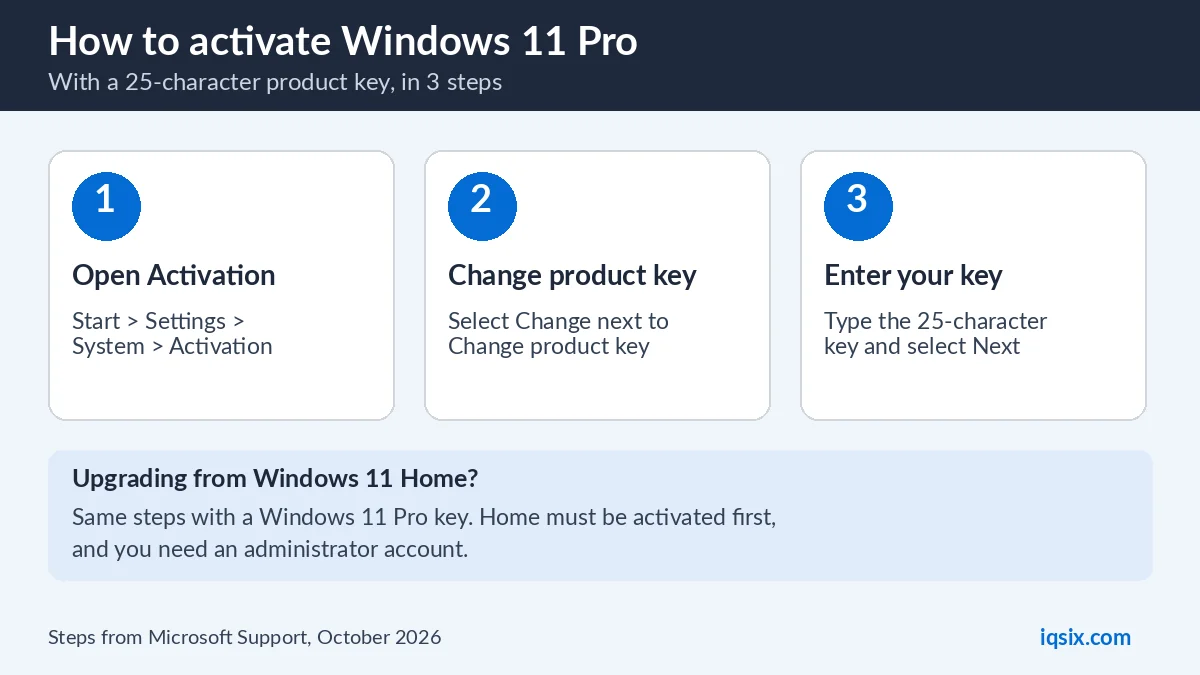
This is the standard way to activate Windows 11 Pro with a product key:
- Select Start, then Settings.
- Go to System > Activation.
- Next to Change product key, select Change.
- If User Account Control appears, confirm with an administrator account.
- Enter your 25-character Windows 11 Pro product key and select Next.
- Follow the prompts, then check that the Activation status shows Windows is active.
Tip: if a pasted key is rejected, type it by hand. Microsoft notes that copying and pasting can replace the hyphens in a key with long dashes, which makes a good key look invalid (Microsoft Learn).
How to upgrade Windows 11 Home to Pro with a product key
If your PC came with Windows 11 Home, you do not need to reinstall Windows. You can upgrade to Pro from the same Activation page:
- Make sure Windows 11 Home is activated (Settings > System > Activation). Microsoft says these steps only apply to an activated copy of Windows 11 Home.
- Next to Change product key, select Change.
- If User Account Control appears, enter an administrator account and select Yes.
- Enter your 25-character Windows 11 Pro product key.
- Select Next to start the upgrade.
Windows then starts the upgrade to Pro. Save your work and back up important files before you begin, as you would before any big system change. Full details are on Microsoft’s page Upgrade Windows Home to Windows Pro.
Microsoft also sells the upgrade in Microsoft Store: under Upgrade your edition of Windows, select Open Store. If you already have a Windows 11 Pro product key, the Change product key method above is all you need.
Activate Windows 11 Pro during a clean install
If you install Windows 11 Pro from scratch, setup asks for a product key. You can enter your 25-character key there, or select I don’t have a product key and activate later in Settings > System > Activation with the steps above.
Make sure you install the same edition as your key. A Windows 11 Pro key is for Windows 11 Pro, and a key for another edition (for example Enterprise) causes an activation error. Still on Windows 10? See your options after Windows 10 end of support.
How to check if Windows 11 is activated
Open Start > Settings > System > Activation. Your status appears next to Activation status. If Windows is not activated, the same page offers options to fix it, such as Troubleshoot or Change product key.
You can also check from the command line: open Command Prompt and run slmgr /dli to display the license information for your Windows edition (Microsoft Learn: slmgr options).
Link your Microsoft account to your Windows 11 license
Microsoft says it is essential to link your Microsoft account to the Windows 11 license on your device. When the license is linked, you can use the Activation troubleshooter to reactivate Windows after a big hardware change, such as a new motherboard.
To link it, sign in to Windows with your Microsoft account (Settings > Accounts > Your info). The Activation page then shows that Windows is activated with a digital license linked to your Microsoft account.
Windows 11 activation errors and how to fix them
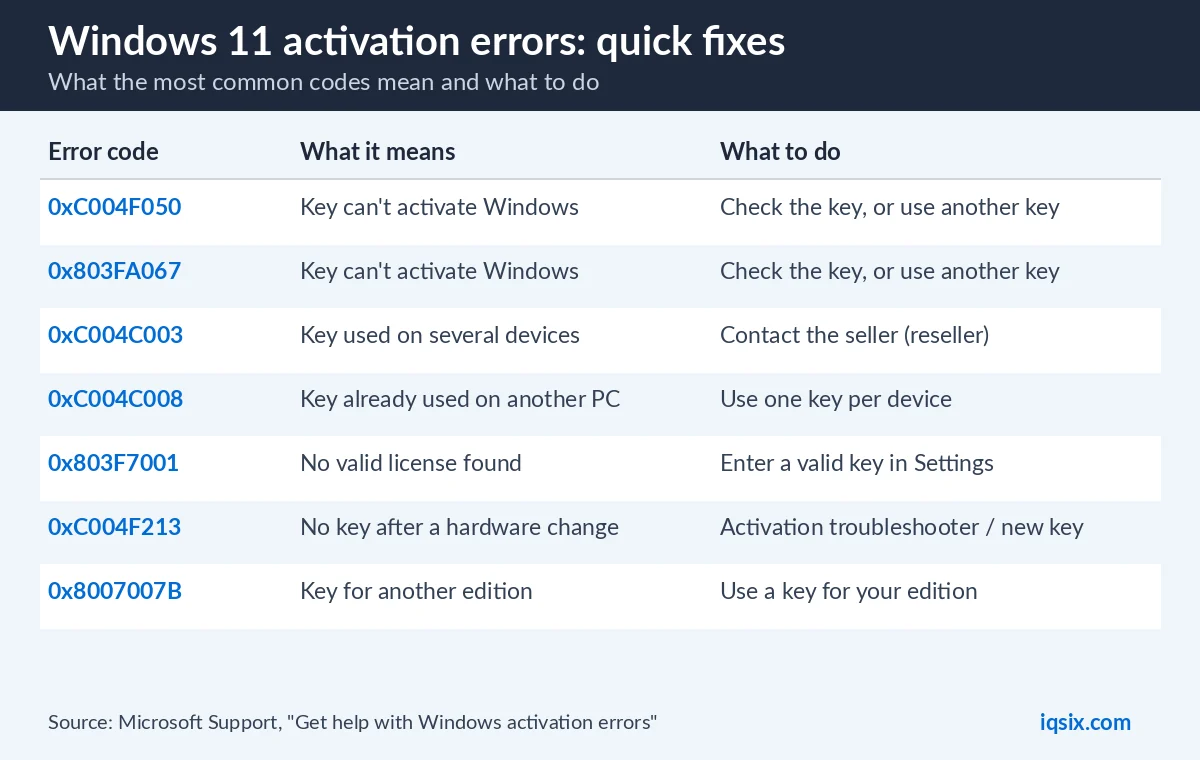
If activation fails, Windows shows an error code. These are the most common ones, with the explanation from Microsoft’s page Get help with Windows activation errors:
| Error code | What it means | What to do |
|---|---|---|
| 0xC004F050 | The product key can’t be used to activate Windows | Check the key for typos, or use a different key |
| 0x803FA067 | Same group as 0xC004F050 | Check the key, or use a different key |
| 0xC004C003 | The key was used, or tried, on several devices | Contact the seller you bought the key from |
| 0xC004C008 | The key is already used on another device | Use one product key per device |
| 0x803F7001 | No valid license was found for this device | Enter a valid key with Change product key |
| 0xC004F213 | No product key found, often after a hardware change | Run the Activation troubleshooter, or enter a key |
| 0x8007007B | Key for another edition (for example Enterprise) | Use a key that matches your edition |
If none of these help, open Settings > System > Activation and select Troubleshoot to run the Activation troubleshooter, or contact Microsoft Support. If you bought your key from IQSIX, message us on WhatsApp first with a screenshot of the error, and we will help you.
Activate Windows 11 Pro from the command line (advanced)
IT users can do the same with slmgr, the licensing tool built into Windows. Open Command Prompt as administrator and run these two commands:
slmgr /ipk XXXXX-XXXXX-XXXXX-XXXXX-XXXXXinstalls the product key (replace the X’s with your key);slmgr /atoasks Windows to activate online.
Microsoft notes that installing a key needs an elevated (administrator) Command Prompt, and that you should restart the PC after you install a new key (slmgr documentation). For most people, the Settings method is easier.
What does Windows 11 Pro add over Home?
Windows 11 Pro includes everything in Home, plus tools for security, remote work and business, such as:
- BitLocker Drive Encryption to protect your drives;
- Remote Desktop, so you can connect to this PC from another device;
- Hyper-V and Windows Sandbox to run virtual machines and test apps safely;
- Group Policy and tools to join a company domain or Microsoft Entra ID.
See Microsoft’s Home vs Pro comparison for the full list, or our plain-language guide Windows 11 Home vs Pro.
Buy a Windows 11 Pro key from IQSIX

IQSIX sells a Windows 11 Pro product key for one PC. You get the 25-character key by email after your payment is confirmed, and you activate it with the steps in this guide.
- Delivery: by email after your payment is confirmed (or on WhatsApp if you ask).
- Payment: crypto, card, or a Remitly bank or mobile money transfer at checkout.
- One PC: use the key on one device only.
- Help: we help you activate on WhatsApp or through our contact page.
Need Office too? See Microsoft 365 Personal (and our guide on how to redeem a Microsoft 365 product key), Office 2021 Professional Plus (note: Microsoft ended support for Office 2021 on 13 October 2026, so it no longer gets security updates) or all our software keys.
Windows 11 Pro activation FAQ
How do I activate Windows 11 Pro with a product key?
Go to Start > Settings > System > Activation, select Change next to Change product key, enter the 25-character key and select Next. Then check that the Activation status shows Windows is active.
Can I upgrade Windows 11 Home to Pro without reinstalling?
Yes. On an activated copy of Windows 11 Home, go to Settings > System > Activation, select Change next to Change product key and enter a Windows 11 Pro key. Windows then starts the upgrade to Pro.
Where do I find my Windows product key?
Microsoft says a key can be in your purchase email, on the device packaging or on the Certificate of Authenticity (COA) sticker. If you bought a key from IQSIX, it is in the email we sent you.
Why does Windows say my product key is invalid?
Usually because of a typo, a key for a different edition, or a key that was already used on another device. Error 0xC004F050 means the key cannot be used to activate Windows. Check the error table in this guide.
Can I use one Windows 11 Pro key on two PCs?
No. Microsoft says product keys are assigned to a single device. Error 0xC004C008 appears when a key is already in use on another PC.
What happens to my license after I change the motherboard?
Windows may not find a license (error 0xC004F213). If your license was linked to your Microsoft account before the change, run the Activation troubleshooter and sign in with that account to reactivate.
Sources, checked 17 October 2026: Microsoft Support: Activate Windows, Upgrade Windows Home to Windows Pro, Get help with Windows activation errors and Microsoft Learn: slmgr options. Windows menus can change after updates.
