 Skip to content
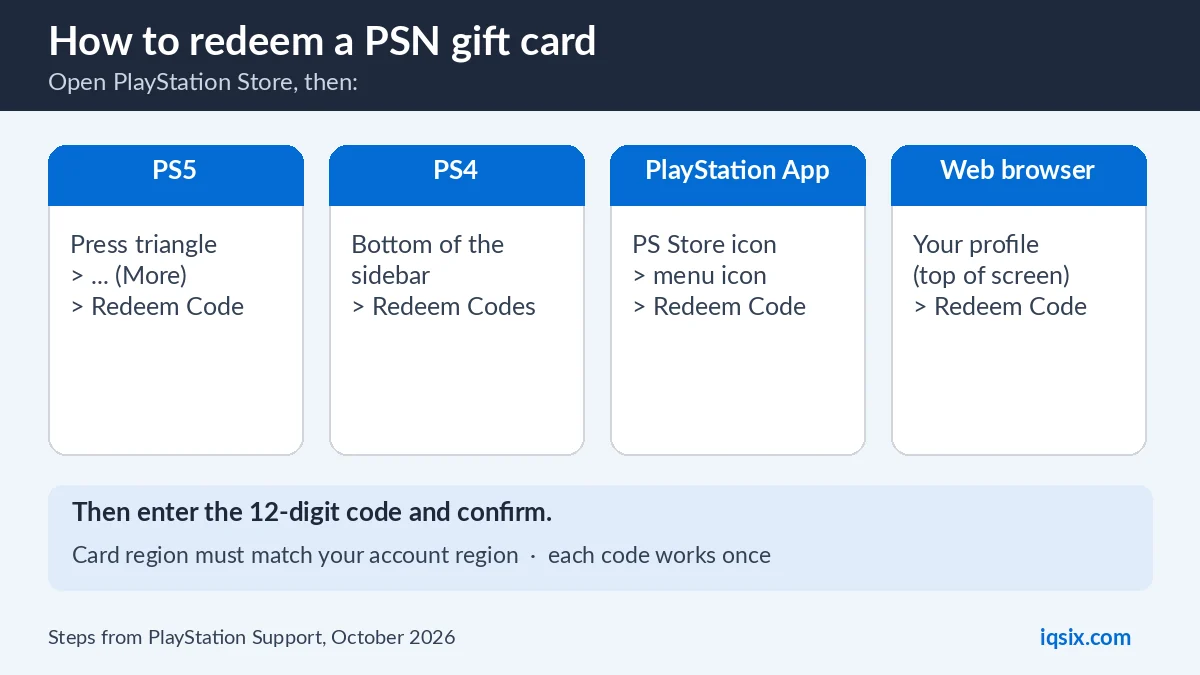
Short answer: here is how to redeem a PSN gift card: open PlayStation Store on your PS5, PS4, the PlayStation App or a web browser, choose Redeem Code, type the 12-digit code and confirm. The money goes into your PlayStation wallet. The card must be from the same region as your PlayStation account, so a US card only works on a US account.
Below you will find the exact steps for each device, what to check before you redeem, and how to fix a code that does not work. The steps come from Sony’s own help page, checked in October 2026.
- Code: 12 digits (codes with 10 digits are discount codes)
- Where: PS5, PS4, PlayStation App or web browser
- Region: the card must match your account’s region
- One use: each code works only once
- Wallet: funds cannot be moved to another account
Table of Contents
Before you redeem: 4 quick checks
Most problems with a PSN gift card come from one of these four things. Check them first and the code will usually work the first time.
- Same region. A PSN gift card only works in the PlayStation Store region it was made for. The region is printed on the card or shown in the product name, for example “USA”. Your account’s region is set when you create the account and cannot be changed later. (see how to check your account region).
- The right account. Sign in to the account that should get the money. Sony cannot move wallet funds or content from one account to another.
- 12 digits, not 10. Gift card and wallet codes have 12 digits. A code with 10 digits is a discount code: you use it at checkout when you buy something, not on the Redeem Code screen.
- Child accounts. If you play on a child account, the family manager (usually a parent) must redeem wallet codes on their own account. They can then set a monthly spending limit for the child.
PSN card, PlayStation Network card or PlayStation Store gift card?
They are the same thing. Sony now calls them PlayStation Store gift cards, but many shops and players still say PSN card, PSN code or PlayStation Network card. All of them add money to the wallet of your PlayStation account, and you redeem all of them the same way.
Do not confuse them with PlayStation Plus cards or game codes. Those give you a membership or a game directly instead of wallet money, but you enter them on the same Redeem Code screen.
How to redeem a PSN gift card on PS5
On a PlayStation 5 the Redeem Code option sits in the PlayStation Store menu:
- Open PlayStation Store from the home screen.
- Press the triangle button to open the menu.
- Select … (More), then Redeem Code.
- Carefully enter the 12-digit code and select Redeem.
The funds are added to your wallet, and the code appears in your transaction history. You can spend the money on the next thing you buy in PlayStation Store.
How to redeem a PSN code on PS4
On a PlayStation 4 the option is at the bottom of the store menu:
- Open PlayStation Store.
- Scroll to the bottom of the sidebar and select Redeem Codes.
- Carefully enter the 12-digit code and select Continue.
- Select Confirm (or Yes) to add the funds.
How to redeem a code in the PlayStation App
You do not need your console nearby. The free PlayStation App on your phone can redeem a PlayStation gift card too:
- Open the PlayStation App and sign in with your PlayStation account.
- Select the PS Store icon.
- Select the menu icon on the right side of the screen, then Redeem Code.
- Carefully enter the 12-digit code and select Continue.
How to redeem a PSN gift card on the web
On a computer, redeeming in the browser is often the quickest way:
- Go to PlayStation Store in your browser and sign in.
- Select your profile at the top of the screen.
- Select Redeem Code from the drop-down menu.
- Carefully enter the 12-digit code and select Continue.
The money is on your account straight away, so it is ready the next time you open the store on your PS5 or PS4.
What can you buy with PSN wallet funds?
According to Sony’s gift card page, PlayStation Store gift cards can only be used on digital products in PlayStation Store. You can use your wallet funds for:
- digital games and add-ons (DLC);
- subscriptions, including any PlayStation Plus membership (see how to buy PlayStation Plus with a PSN gift card and PS Plus Essential vs Extra vs Premium);
- in-game currencies such as V-Bucks, EA SPORTS FC Points and Call of Duty Points.
You cannot use the funds for physical products. Sony’s terms of service also say that wallet funds are non-refundable and cannot be transferred, except where the law requires it.
Sony limits how much money one wallet can hold. If a card would take your balance over that limit, you cannot add it until you spend some of your funds. That is one reason to choose a card value you plan to use soon.
PSN gift card not working? 8 fixes
If PlayStation Store says your code is not valid, work through this list. It follows Sony’s troubleshooting page.
- Check for typos. Enter the code again slowly. Letters and numbers that look alike, such as O and 0, are easy to mix up.
- Reveal the whole code. On a physical card, scratch gently with a coin until every character is visible.
- Match the region. A card only works in its own PlayStation Store region. A US card does not work on an account from another region.
- Check if it was used. Each code works once. Look at your transaction history to see if it was already redeemed.
- Use discount codes at checkout. A 10-digit code is a discount code, not a gift card.
- Look for an expiry date. Some codes have an expiry date printed on the voucher.
- Child account? Ask the family manager to redeem the code on their account.
- Network problems. Check the PlayStation Network status page. If everything is up, sign out of PlayStation, sign back in and try again.
Still stuck? Contact PlayStation Support with the code. If you bought the card from IQSIX, message us on WhatsApp first with a photo of the error, and we will check it with you.
How to check your PSN wallet balance
After you redeem, you can check that the money arrived. Sign in to Account Management on playstation.com to see your wallet funds and your transaction history, where every redeemed code is listed. Your wallet balance also appears when you buy something in PlayStation Store.
Keeping an eye on your balance helps you avoid the wallet limit and plan which card value to buy next.
Which PSN gift card do you need?
Always buy a card from the same region as your PlayStation account. A US card works on accounts registered in the United States, a UK card on UK accounts, and so on. Because you cannot change an account’s region, a card from the wrong region will never work on that account.
Then pick the value. A small card ($10 or $20) is good for add-ons, in-game currency or a short PlayStation Plus plan. A larger card ($50 or $100) covers a new full game. Remember the wallet limit if your balance is already high.
Digital code or physical card?
You can buy a PSN gift card in two forms. A digital card is just a code: an online shop sends it to you by email, and you can redeem it a few minutes later. A physical card is sold in shops, and you scratch the back to reveal the code.
Sony notes that some voucher codes must be activated at the moment of purchase. If a physical card bought in a shop does not work, keep the receipt and ask the shop to check that the card was activated. With a digital code there is no card to lose or scratch.
Giving a PSN gift card as a present
A PlayStation gift card is an easy present for any PlayStation player, because they choose what to buy. Send them the code (Sony also offers a printable version for gifting), and they redeem it on their own account with the steps above.
Before you buy, find out which region their account is from. The card must match their account, not yours, so a US card is only a good gift for someone with a US PlayStation account.
Keep your PSN code safe
A gift card code works like cash: whoever redeems it first gets the money. Never post your code online, and never send it to someone you do not know, even if they say they work for PlayStation.
Be careful with anyone who asks you to pay them with a gift card. The US Federal Trade Commission says that only scammers tell you to buy a gift card to pay them (FTC: gift card scams). Real companies and government offices do not ask for payment in gift card codes.
Buy codes only from sellers you can contact, and redeem your code soon after you get it. For all six safety rules, see what is a gift card code and how to use one safely.
Buy a US PSN gift card from IQSIX


IQSIX sells PlayStation Store gift cards for US accounts in $10, $20, $50 and $100 values. You get a digital code by email, so there is nothing to scratch.
- Delivery: after your payment is confirmed, we send the code by email (or on WhatsApp if you ask).
- Payment: crypto, card, or a Remitly bank or mobile money transfer at checkout.
- Region: USA only, for PlayStation accounts registered in the United States.
- Help: we help you redeem the code on WhatsApp or through our contact page.
Also play on Xbox, Nintendo Switch or PC? Read our guides to Xbox Game Pass Ultimate perks, redeeming a Nintendo eShop card and activating a Steam key.
PSN gift card FAQ
How do I redeem a PSN gift card on PS5?
Open PlayStation Store, press the triangle button, select … (More) and then Redeem Code. Enter the 12-digit code and select Redeem. The funds go straight into your wallet.
Where do I enter a PlayStation gift card code online?
Go to PlayStation Store in your web browser and sign in. Select your profile at the top of the screen, choose Redeem Code, enter the 12-digit code and select Continue.
Can I use a US PSN card on an account from another region?
No. A PSN gift card only works on an account from the same region as the card, and you cannot change an account’s region after you create it.
Why does my PSN code say it is not valid?
The most common reasons are a typo, a card from another region, a code that was already used, an expired code, or a 10-digit discount code entered as a gift card. Check the 8 fixes in this guide.
Do PSN gift cards expire?
Some voucher codes have an expiry date printed on them, so check the card or the email with your code. Redeem the code soon after you buy it to be safe.
Can I transfer PSN wallet funds to another account?
No. Sony does not move wallet funds or content between accounts, so always sign in to the right account before you redeem a code.
Sources, checked 17 October 2026: PlayStation Support: redeem a voucher code, PlayStation Support: voucher code problems, PlayStation Store gift cards and the PlayStation terms of service. Menus can change after system updates.
