 Skip to content
Short answer: to check account region settings, look at the country saved in your account: on PlayStation in Account Management > Your Information, on Xbox in your Microsoft account under Your info, on Nintendo in your Nintendo Account user info, and on Steam in your account details. A PSN, Xbox or Nintendo card only works when its region matches that country, so check it before you buy.
A wrong region is the most common reason a gift card code is rejected. This guide shows where to check account region details on each platform, what you can and cannot change, and which card to buy. The steps come from PlayStation, Microsoft, Nintendo and Steam support pages, checked in October 2026.
- PlayStation: region is fixed when you create the account and cannot be changed
- Xbox / Microsoft: change only when you really move; limits apply
- Nintendo: the account country decides which eShop you see
- Steam: wallet codes are converted to your wallet currency
- Rule of thumb: buy the card for your account’s country, not your location
Table of Contents
Why your account region matters
Gift cards and codes for PlayStation, Xbox and Nintendo are made for one region. When you redeem a code, the store compares the code’s region with the country saved in your account. If they do not match, the code is rejected, even if it is valid. A US card only works on an account set to the United States.
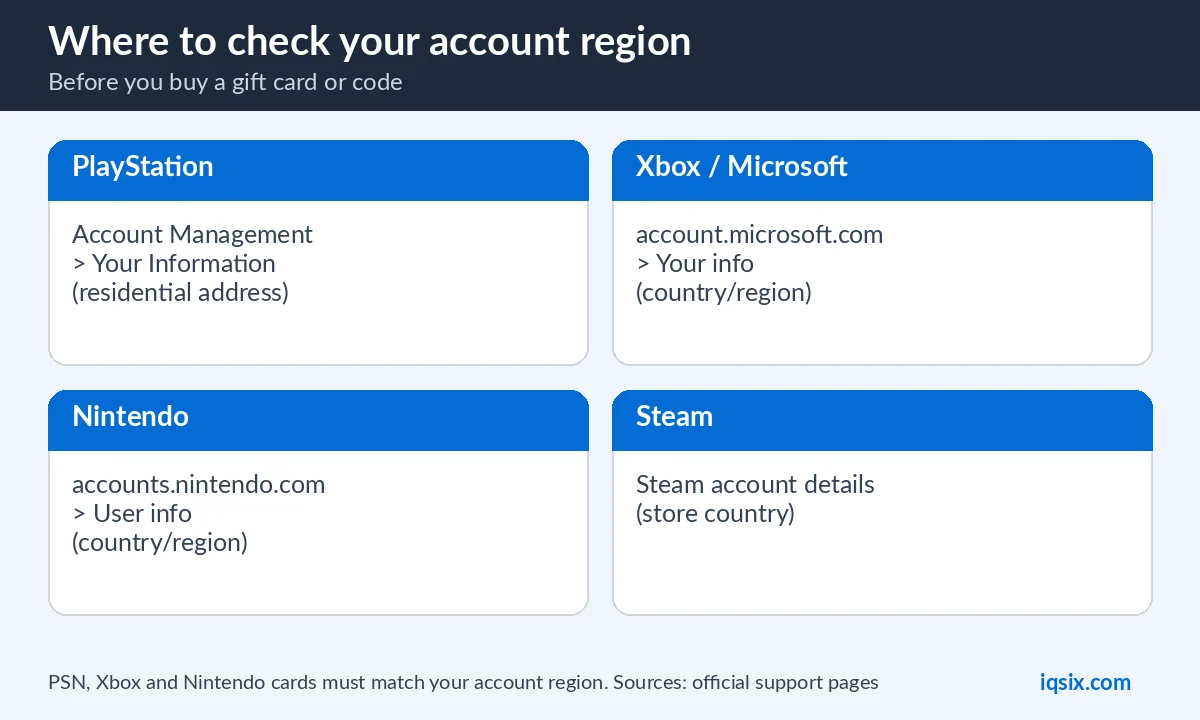
So before you buy any card, find out which country your account uses. It takes less than a minute, and it saves you from a code you cannot use.
How to check your PlayStation account region
Sony explains two ways (PlayStation Support):
- Online: sign in to Account Management on playstation.com, open Your Information and look at your residential address. The country or region is shown at the bottom.
- In the PlayStation App: open Settings, then Account Information, and look at your residential address.
Important: the country or region of a PlayStation account cannot be changed after the account is created. If your account is from another region, a US PSN card will never work on it, so buy a card for your own region instead.
How to check your Xbox or Microsoft account region
Your Xbox account is a Microsoft account. To check account region details, sign in at account.microsoft.com and open Your info: your country or region is shown in your profile information (Microsoft Support). Your console has its own location setting too, under Profile & system > Settings > System > Language & location.
For a Game Pass or Xbox code to work, your Microsoft account region should match the code, and your console location should match where you live (Xbox Support).
Can you change your Xbox region?
Microsoft lets you change your account country when you actually move to a new country, but it warns about the side effects (Xbox Support):
- you may not be able to change it again for three months;
- any money in your Microsoft account balance does not move to the new region;
- some content and subscriptions bought in one region may not work in another;
- Microsoft Rewards points have to be used in the region where the account was set up.
So do not change your region just to use a cheaper card: it can cost you more than you save.
How to check your Nintendo Account region
Sign in at accounts.nintendo.com and look at your user info: the country or region is listed there. Nintendo eShop follows this setting, so it decides which eShop you see and which cards you can redeem. If you get error 2813-0999, Nintendo says to check that your country setting is correct (Nintendo Support).
A US Nintendo eShop card only works on a Nintendo Account set to the United States.
How to check your Steam region
In Steam, open your account details from your profile menu to see your store country. Steam Wallet codes are different from console cards: Steam says codes are converted into your wallet’s currency when you redeem them (Steam). Game keys can still be region-locked by the publisher, so check the product page before you buy a key.
Region and currency are not the same thing
Many people guess their region from the prices they see. That is not reliable: some stores outside the United States also show prices in US dollars, so the currency alone does not prove that your account is a US account. Always check the country saved in the account itself, as shown above.
What happens if you redeem a card from the wrong region?
The store simply refuses the code with an error. The code is not used up when that happens, so it can still be redeemed later on an account from the matching region. If you bought it by mistake, stop trying and contact the seller first: many shops can help before a code is redeemed, but nobody can move money once it is on an account.
Buying a gift card for someone in another country
When you buy a card as a present, what matters is the region of their account, not yours. Ask them to check their account region with the steps in this guide, or simply ask which store they use, before you buy. A US card is a good gift only for someone whose account is set to the United States.
Moving to another country?
If you move abroad, the rules are different on each platform. Microsoft lets you update your account country when you really move, with the limits listed above. Sony does not allow changing the region of an existing PlayStation account, so your games stay on your current account and you keep buying cards for that account’s region. Nintendo explains region changes in its own support pages.
Shared consoles and family accounts
On a shared console, every person signs in with their own account, and each account can have a different country. A card works only on the account it is redeemed on, and the money cannot be moved to another account afterwards. Before you redeem, make sure the right person is signed in, and check that this person’s account region matches the card. For children, the parent or family manager often has to redeem wallet cards on their own account.
Quick checklist before you buy
- Check the country saved in your account (not the console language or the prices).
- Compare it with the region in the product name, for example “USA”.
- For a gift, check the other person’s account region.
- Keep a screenshot of your account region in case you need help later.
- Ask the seller before you buy if anything is unclear.
New to digital codes? Read what is a gift card code to see how codes work and how to keep them safe.
Which card should you buy?
- Your account is set to the United States: buy US cards and codes.
- Your account is set to another country: buy a card for that country, not a US card.
- Not sure: check with the steps above, or send us a screenshot of your account region on WhatsApp before you buy.
At IQSIX the region is always in the product name, for example “USA”. If the product name and your account region do not match, do not buy that card.
Common region mistakes
- Looking at the language of the console instead of the account country.
- Assuming that living in a country means the account is set to that country.
- Buying a card for a friend without checking their account region.
- Using a VPN to get around region rules, which breaks the platforms’ terms and can get accounts restricted.
US cards and codes at IQSIX


IQSIX sells US PSN gift cards, a US Nintendo eShop card and a US Xbox Game Pass Ultimate code. They are for accounts set to the United States. You get the code by email after your payment is confirmed.
- Payment: crypto, card, or a Remitly bank or mobile money transfer at checkout.
- Help: not sure about your region? Ask us on WhatsApp or through our contact page before you buy.
Then follow our guides: redeem a PSN gift card, redeem a Nintendo eShop card and redeem a Game Pass code.
Account region FAQ
How do I check my PSN account region?
Sign in to Account Management on playstation.com, open Your Information and look at the residential address; the country or region is shown at the bottom. In the PlayStation App, open Settings > Account Information.
Can I change my PlayStation account region?
No. Sony says the country or region of a PlayStation account cannot be changed after the account is created, so always buy cards for your account’s region.
How do I check my Xbox account region?
Sign in at account.microsoft.com and open Your info to see your country or region. Your console location is under Settings > System > Language & location.
Will a US gift card work on my account?
Only if your account is set to the United States. PSN, Xbox and Nintendo cards must match the account region, or the code is rejected.
Do Steam Wallet codes work in any region?
Steam says wallet codes are converted into your wallet’s currency when you redeem them. Game keys can still be region-locked by the publisher.
Should I use a VPN to redeem a card from another region?
No. Using a VPN to get around region rules breaks the platforms’ terms and can get your account restricted.
Sources, checked 17 October 2026: PlayStation: check your account country/region, Microsoft: change your country or region, Xbox: moving to a new country, Nintendo: error 2813-0999 and Steam wallet codes.
