 Skip to content
Short answer: to redeem a Nintendo eShop card, open Nintendo eShop on your Nintendo Switch 2 or Nintendo Switch, choose your user, select Redeem Code on the left, enter the 16-character code and confirm. You can also redeem it online at ec.nintendo.com/redeem. The card must match the country of your Nintendo Account: a US Nintendo eShop card works on a US account.
This guide shows both ways to redeem a Nintendo eShop card, what to check first, the limits that apply in the US, and how to fix the common error codes. Everything comes from Nintendo’s support pages, checked in October 2026.
- Code: 16 characters, never uses the letters O, I or Z
- Where: Nintendo eShop on Switch 2 or Switch, or ec.nintendo.com/redeem
- Region: the card must match your Nintendo Account country
- US balance limit: up to $800 in your Nintendo eShop balance
- Expiry: US Nintendo eShop cards have no expiration date
Table of Contents
Before you redeem: 4 quick checks
- Your Nintendo Account country. Nintendo eShop follows the country setting of your Nintendo Account, and a card can only be redeemed in its own region. You can check the country by signing in at accounts.nintendo.com (see how to check your account region).
- The right user. Funds belong to the Nintendo Account of the user who redeems the code, and you cannot move them to another account later. On a shared console, pick your own user.
- The right code. Enter the 16-character download code, not the control number. A control number has hyphens; the code you need has none.
- Your balance. In the US your Nintendo eShop balance cannot go above $800. If a card would take you over that, spend some funds first.
How to redeem a Nintendo eShop card on Nintendo Switch 2 or Switch
The steps are the same on Nintendo Switch 2 and the original Nintendo Switch:
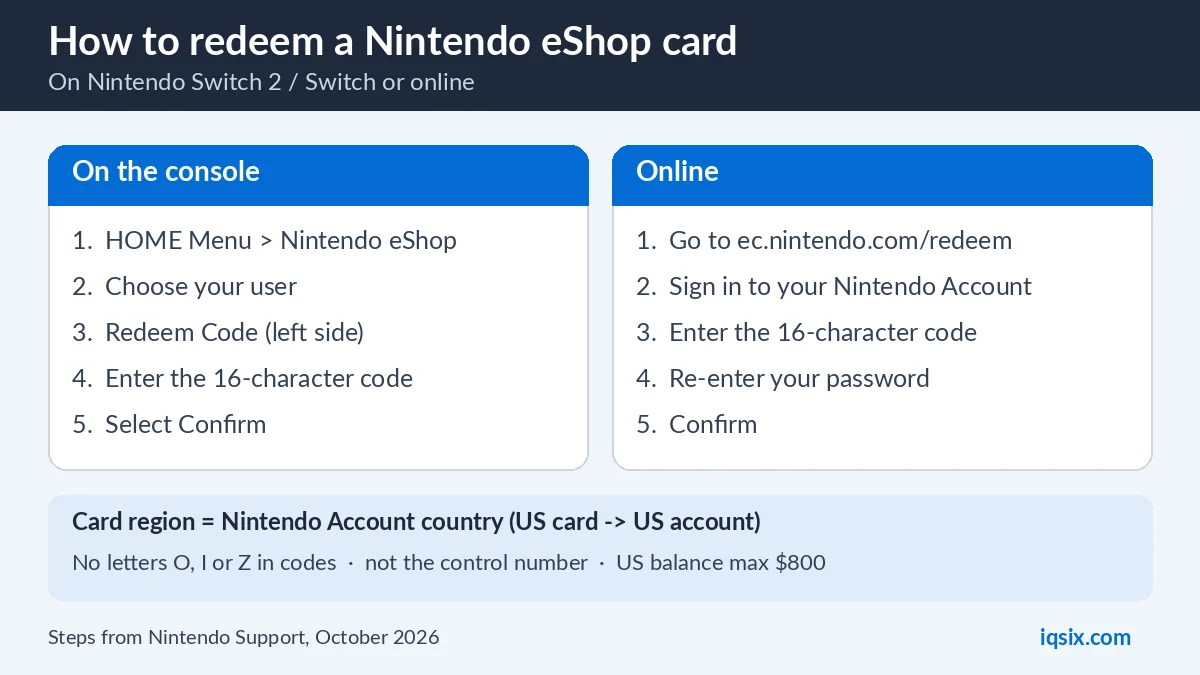
- Select Nintendo eShop on the HOME Menu.
- If there is more than one user on the console, select the user who should get the funds.
- Select Redeem Code on the left side of the screen (some versions call it Enter Code).
- Enter the 16-character code and select Confirm. The funds are added to your balance.
The new balance appears at the top right of Nintendo eShop, and you can spend it straight away on games and add-ons.
How to redeem a Nintendo eShop card online
If your console is not nearby, you can redeem a Nintendo eShop card in a web browser (Nintendo’s online redeem guide):
- Go to ec.nintendo.com/redeem.
- Sign in with your Nintendo Account.
- Enter the 16-character code and continue.
- Re-enter your Nintendo Account password and confirm.
Nintendo sends a confirmation email to the address on your account. One condition: your Nintendo Account must have opened Nintendo eShop on a Nintendo Switch 2 or Nintendo Switch at least once before you can redeem codes online.
What can you buy with Nintendo eShop funds?
Funds from a Nintendo eShop card can be used for digital content in Nintendo eShop, such as full games, add-on content (DLC) and Nintendo Switch Online memberships. See Nintendo’s eShop card page for what is available in your country, and our guide on Nintendo Switch Online with an eShop card for how many cards each plan needs.
According to the US Nintendo eShop Card terms, the card is not reloadable and has no expiration date. Once redeemed, the balance can only be used on that one Nintendo eShop account.
Funds card, download code or game voucher?
Nintendo sells three kinds of codes, and they all use the same Redeem Code screen. A funds card (what most people call an eShop gift card) adds money to your balance, so you choose what to buy. A download code gives you one specific game or add-on. A Nintendo Switch Game Voucher, available to Nintendo Switch Online members, can be exchanged for selected games.
This guide is about funds cards. If your code is for a specific game, the steps are the same, but the game starts downloading instead of money being added.
Digital code or physical card?
A digital card is only a code: an online shop sends it to you by email, and you can redeem it within minutes. A physical card is sold in shops, and you scratch the back to see the code. Shops activate physical cards at the till, so keep your receipt in case a card does not work.
Some physical cards also print a control number next to the code. Only the 16-character code goes into Nintendo eShop.
Nintendo eShop card not working? Fixes for common errors
If Nintendo eShop does not accept your code, check this list. It follows Nintendo’s download code troubleshooting.
- Error 2813-0999. The country set on your Nintendo Account does not have a Nintendo eShop. Sign in at accounts.nintendo.com and check the country setting (Nintendo support).
- Error 2813-5509. You reached the amount you can add in 24 hours, or the card would take your balance over the maximum. Wait at least 24 hours, and make sure the new total stays within the limit (Nintendo support).
- Wrong region. A card for one region cannot be redeemed on an account from another region. A US card needs a Nintendo Account set to the United States.
- Typos. Nintendo codes never use the letters O, I or Z, so if you see something like an O, it is a zero.
- Control number instead of code. Some cards print a control number with hyphens. Enter the 16-character code without hyphens instead.
- Code already used. Each code works once. Check your balance and the email from Nintendo to see if it was already redeemed.

If the code still does not work, contact Nintendo Support. If you bought the card from IQSIX, message us on WhatsApp with a photo of the error first, and we will check it with you.
Nintendo eShop balance limits in the US
Nintendo limits how much money one account can hold. In the United States your Nintendo eShop balance cannot be more than $800 (Nintendo: add funds in the US). There is also a limit on how much you can add within 24 hours. If you hit either limit, spend some of your balance or wait a day before you add the next card.
For most players these limits never matter. They only come up if you redeem several large cards at once.
Spending limits for children
If your child has their own Nintendo Account in your family group, you can limit or block their spending in Nintendo eShop from your Nintendo Account settings (Nintendo explains how). That way a gift card can be used for the games you agree on, and nothing more.
Which Nintendo eShop card do you need?
Buy a card for the same country as your Nintendo Account. A US Nintendo eShop card works on accounts set to the United States, a UK card on UK accounts, and so on. If your account is set to another country, a US card will not work on it.
Then choose the value. A $10 card is enough for many indie games, add-ons or a Nintendo Switch Online membership, and you can add several cards to reach the price of a bigger game.
Giving a Nintendo eShop card as a present
A Nintendo eShop card is an easy gift for anyone with a Nintendo Switch 2 or Switch, because they choose the games themselves. Send them the 16-character code, and they redeem it on their own account with the steps above. Check first that their Nintendo Account is set to the same country as the card.
Keep codes private until they are redeemed. A code works like cash: whoever redeems it first gets the funds.
Buy a US Nintendo eShop card from IQSIX

IQSIX sells a $10 Nintendo eShop card for US Nintendo Accounts. You get the 16-character code by email, so there is nothing to scratch.
- Delivery: by email after your payment is confirmed (or on WhatsApp if you ask).
- Payment: crypto, card, or a Remitly bank or mobile money transfer at checkout.
- Region: USA only, for Nintendo Accounts set to the United States.
- Help: we help you redeem the code on WhatsApp or through our contact page.
More gaming guides: how to redeem a PSN gift card and Xbox Game Pass Ultimate perks. Or see all our game cards and top-ups.
Nintendo eShop card FAQ
How do I redeem a Nintendo eShop card on Switch?
Open Nintendo eShop from the HOME Menu, choose your user, select Redeem Code on the left, enter the 16-character code and confirm. The funds are added to your Nintendo eShop balance.
Can I redeem a Nintendo eShop card online?
Yes. Go to ec.nintendo.com/redeem, sign in with your Nintendo Account, enter the code and re-enter your password. Your account must have opened Nintendo eShop on a Switch 2 or Switch at least once.
Do Nintendo eShop cards expire?
According to the US Nintendo eShop Card terms, the cards have no expiration date. They are not reloadable, and once redeemed the balance stays on one Nintendo eShop account.
Will a US Nintendo eShop card work in another country?
Only on a Nintendo Account set to the United States. Nintendo eShop follows your account country, and a card can only be redeemed in its own region.
What does error 2813-5509 mean?
You reached the amount you can add within 24 hours, or the card would take your balance over the maximum ($800 in the US). Wait at least 24 hours or spend some of your balance first.
Can I move my eShop balance to another account?
No. Funds belong to the Nintendo Account of the user who redeemed the code and cannot be transferred to another account later.
Sources, checked 17 October 2026: Nintendo Support: redeem a download code, redeem online, add funds in the US, error 2813-5509 and the Nintendo eShop Card terms. Menus can change after system updates.
