 Skip to content
Short answer: to activate Steam key codes, open the Steam app, go to Games > Activate a Product on Steam, accept the agreement, enter your key and select Next. You can also activate a key on the Steam website at store.steampowered.com/account/registerkey. The game or add-on then appears in your Steam Library.
This guide covers both ways to activate a Steam key, the difference between game keys and wallet codes, region locks, and what the common error messages mean. The information comes from Steam Support, checked in October 2026.
- Game and DLC keys: Games > Activate a Product on Steam, or the registerkey page
- Wallet codes and gift cards: a different page (redeemwalletcode)
- One account: a key works once, on one Steam account
- Region locks: some keys only work in certain countries
- Problems with a key: contact the seller; Steam cannot replace keys bought elsewhere
Table of Contents
Steam key, wallet code or gift: what do you have?
Steam uses three kinds of codes, and they are redeemed in different places:
- Product key (CD key). Unlocks one game, add-on (DLC) or in-game item on your account. You activate it with Activate a Product on Steam.
- Steam Wallet code or gift card. Adds money to your Steam Wallet. You redeem it on the Redeem a Steam Gift Card or Wallet Code page, not with Activate a Product.
- Steam gift. A game or digital gift card that a friend sends you inside Steam. You accept it from your Steam notifications; there is no code to type.
If you are not sure, look at the email or card: a product key is usually called a “key” or “CD key”, and a wallet code says “Steam Wallet” or “gift card”.
How to activate Steam key codes in the Steam app
This works on Windows, Mac and Linux:
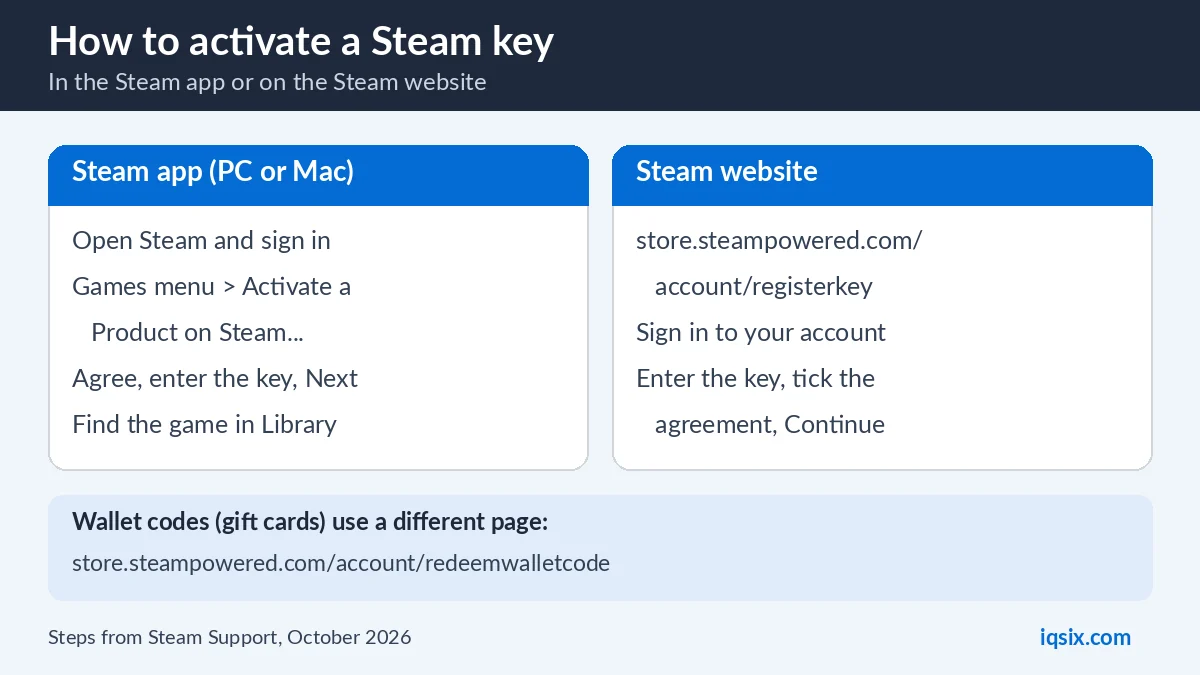
- Open the Steam app and sign in to your account.
- Select the Games menu at the top, then Activate a Product on Steam. (You can also use + Add a Game at the bottom left of your Library.)
- Read and accept the Steam Subscriber Agreement.
- Enter your product key exactly as it is written and select Next.
- When activation is complete, select Finish. The game or add-on is now in your Library, ready to install.
How to activate a Steam key on the website
If the Steam app is not installed, you can activate a key in your browser:
- Go to store.steampowered.com/account/registerkey.
- Sign in to the Steam account that should own the game.
- Enter your product key, tick the box to accept the Steam Subscriber Agreement and select Continue.
- Open Steam later on your PC and install the game from your Library.
This is handy when you buy a key on your phone and want to add it to your account straight away. It is also the easiest way for a Steam Deck: open the registerkey page in a browser on your phone or computer, sign in with the same account and enter the key, and the game appears in the Deck’s library.
Region locks: will the key work in your country?
Steam says most games bought in the Steam store are not region-locked, but some keys sold by shops and publishers only work in certain countries. A region lock is normally shown on the product page or the box. If you see “Game not available in your territory” when you activate, the key was made for another region.
In that case, contact the seller. Do not try to get around a region lock with a VPN or proxy: the Steam Subscriber Agreement does not allow hiding your location to avoid geographic restrictions, and Steam can restrict accounts that do it.
Steam key not working? Common errors

- Invalid Product Code. The key is not a Steam key, or there is a typo. Check every character (letters and numbers like O and 0 are easy to mix up). If it still fails, contact the seller.
- Duplicate Product Code. The key is already registered to a Steam account and cannot be used again. If you never used it yourself, contact the shop you bought it from; Steam Support says it cannot issue replacement keys (Steam Support).
- Not available in your territory. The key is region-locked to another region. Contact the seller.
- Too many activation attempts. After several failed tries, Steam blocks new attempts for a while. Stop, wait, and try once more later instead of retrying again and again.
- Already owned. If you already own the product on this account, Steam will not add it again. Check your Library.
If you bought the key from IQSIX, send us a screenshot of the error on WhatsApp before you try again, and we will check it with you.
Activating in-game currency keys like PUBG G-Coin
Some in-game currencies are sold as Steam keys, for example PUBG G-Coin for PUBG: BATTLEGROUNDS on PC. You activate them exactly like a game: Games > Activate a Product on Steam, or the registerkey page. Then start the game with the same Steam account to use the G-Coin.
Make sure the key is for the PC version on Steam: a Steam key does not work on PlayStation, Xbox or mobile versions of the same game.
Check the system requirements first
Before you activate, open the game’s page in the Steam store and look at the system requirements. Once a key is activated it is tied to your account for good, so it is worth checking that your PC can run the game and that the key is for the right edition (standard, deluxe or an add-on that needs the main game).
Refunds for Steam keys bought outside Steam
Steam’s own refund rules cover games bought in the Steam store. A key bought from another shop is handled by that shop: Steam Support says it does not refund keys bought elsewhere. At IQSIX, our refund policy explains what we can do, and we always help first on WhatsApp if a key does not work.
Because an activated key cannot be moved to another account, check the region, the platform and the edition before you redeem it.
Sharing and gifting
An activated game belongs to your Steam account and cannot be moved to another account. If you use Steam Families, members of your family group can often play games from your library, although some publishers exclude their games from sharing.
If you want to give a game to a friend, send them the unused key so they can activate it on their own account, or buy the game as a gift inside Steam.
Keep your Steam keys safe
A Steam key works like cash: whoever activates it first gets the game. Never post a key in a chat or a screenshot, and only buy keys from sellers you can contact if something goes wrong. If anyone asks you to pay a bill, a fine or a debt with Steam keys or gift cards, it is a scam.
Protect your account too: turn on Steam Guard in the Steam app and use a strong, unique password, so a stolen login cannot take your games.
After activation: install and play
An activated key adds a license to your account, but you still need to download the game. Open your Library, select the game and choose Install. For add-ons and in-game items, start the main game; Steam downloads add-on content with it.
You can install your games on any computer where you sign in to the same Steam account. Big games can take a while to download, so start the download as soon as the key is activated.
Buy game keys and top-ups at IQSIX

IQSIX sells a PUBG G-Coin 510 Steam key for PC and other game cards and top-ups. You get the code by email after your payment is confirmed.
- Delivery: by email after your payment is confirmed (or on WhatsApp if you ask).
- Payment: crypto, card, or a Remitly bank or mobile money transfer at checkout.
- Platform: Steam on PC; activate it with the steps above.
- Help: we help you activate on WhatsApp or through our contact page.
More gaming guides: how to redeem a PSN gift card, how to redeem a Nintendo eShop card and Xbox Game Pass Ultimate perks.
Steam key FAQ
How do I activate a Steam key?
Open Steam, select Games > Activate a Product on Steam, accept the Steam Subscriber Agreement, enter the key and select Next. You can also use store.steampowered.com/account/registerkey in a browser.
Where do I redeem a Steam Wallet code?
Wallet codes and gift cards are not activated as products. Redeem them on the Redeem a Steam Gift Card or Wallet Code page: store.steampowered.com/account/redeemwalletcode.
What does Duplicate Product Code mean on Steam?
The key has already been registered to a Steam account and cannot be used again. If you did not use it, contact the seller; Steam Support cannot issue replacement keys.
Why does Steam say the product is not available in my territory?
The key is region-locked to another region. Contact the seller. Using a VPN to get around region locks is not allowed by the Steam Subscriber Agreement.
Can I activate a Steam key on my phone?
Yes, in your phone browser at store.steampowered.com/account/registerkey. Sign in, enter the key and accept the agreement. The game is then in your Library on your PC.
Can I use one Steam key on two accounts?
No. A product key works once and stays on the Steam account that activated it.
Sources, checked 17 October 2026: Steam Support knowledge base, Steam Support: duplicate key, Steam: activate a product and the Steam Subscriber Agreement. Steam menus can change after app updates.
