
Short answer: Microsoft Office Click to Run is the technology Microsoft uses to install and update Office on Windows. It is not a virus and not a separate app: when Microsoft introduced it, it called Click to Run “a new way of delivering and updating” Office, not a new product. Microsoft 365 and most versions of Office use it, and by default it keeps Office up to date in the background.
This guide shows, with Microsoft’s own steps (checked in October 2026), how to see if your Office uses it, how to repair it, how to update it or stop updates, how to undo a bad update and how to remove it.
- What it is: Microsoft’s install and update technology for Office
- Who has it: Microsoft 365 and most versions of Office (2024, 2021, 2019)
- Check yours: File > Account > About shows “Click-to-Run”
- Office acting up? Quick Repair or Online Repair
- Remove it? Only by uninstalling Office; your files stay
Table of Contents
What is Microsoft Office Click to Run?
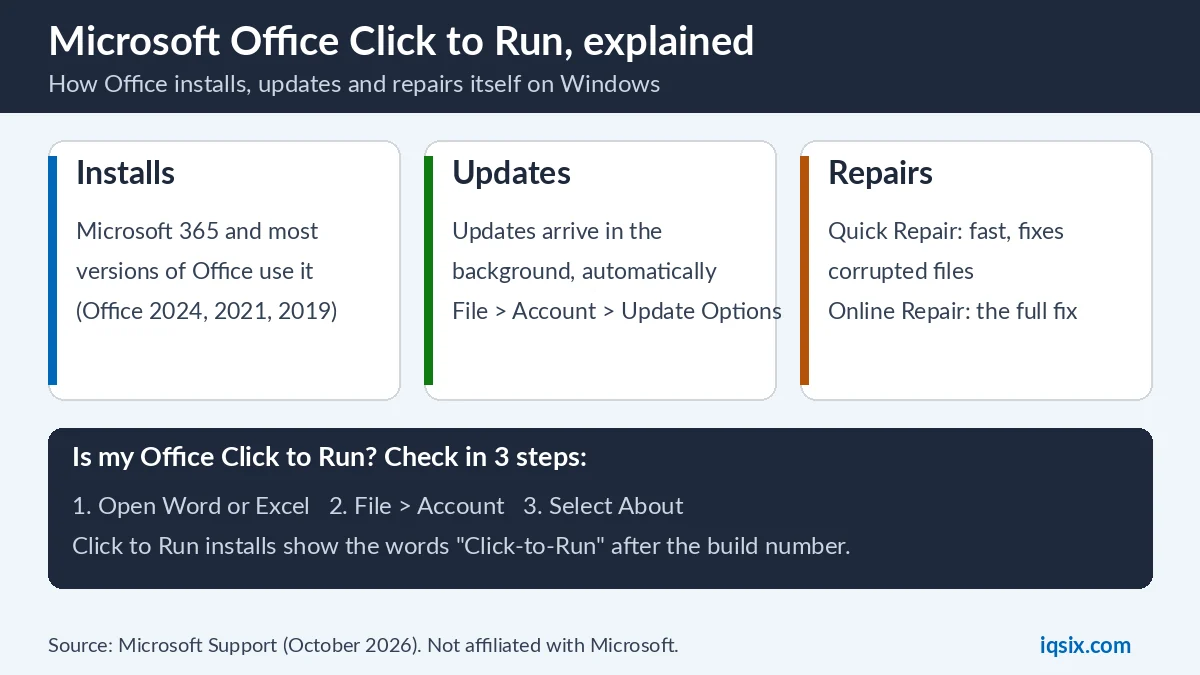
It is how Office gets onto your PC and how it stays up to date. When Microsoft introduced it with Office 2010, it wrote that Click to Run “isn’t a new Office ‘product’. Instead, it is a new way of delivering and updating the programs you’re already familiar with” (Microsoft Support). Back then you could already use Office while the rest was still downloading, a bit like a streamed video.
Today Microsoft says Click to Run “is the technology used to install Microsoft 365 subscription and most versions of Office” (Microsoft Support). The older technology, Windows Installer (MSI), was used for the volume license editions of Office 2016 and older, such as Office Professional Plus and Office Standard. On its repair page, Microsoft puts it simply: “Click-to-run is the most common installation type.”
By default, Office installed this way updates itself automatically when Microsoft releases an update. Microsoft 365 Personal and Family get updates through Current Channel (unless you joined the Microsoft 365 Insider program). Microsoft says Current Channel usually gets two or three releases a month, one of them on the second Tuesday (Microsoft Learn).
Is Click to Run safe? Do you need it?
Yes, it is safe: Click to Run is part of Microsoft Office itself. If you see it on your PC, Office or Microsoft 365 is installed. And yes, you need it as long as you use that Office: it installs the updates, including security fixes, and it runs the repair when something breaks.
If you don’t use Office at all, you don’t need it. The way to remove Click to Run is to uninstall Office (steps below). Microsoft says uninstalling only removes the apps: it “doesn’t remove any files, documents, or workbooks” you made with them (Microsoft Support).
How to check if your Office is Click to Run
Microsoft’s check takes less than a minute:
- Open an Office app such as Word or Excel, and create or open a file.
- Select File > Account (in some apps it says Office Account).
- Under Product Information, select the About button, for example About Word.
- Read the version line. Click to Run installs show a Version and Build number with the phrase “Click-to-Run”. Microsoft Store installs show “Microsoft Store” instead.
The same Product Information area shows your Office product name, such as Microsoft 365 ProPlus or Office Home and Student (Microsoft Support). Microsoft gives one more clue: if the Update Options button is missing and you only see About, you have a volume license install, or your company manages Office updates with Group Policy.
Click to Run vs MSI: what is the difference?
| Click to Run | Windows Installer (MSI) | |
|---|---|---|
| Used for | Microsoft 365 and most versions of Office | Volume license editions of Office 2016 and older, such as Office Professional Plus |
| How to spot it | About shows “Click-to-Run” after the build number | About shows neither “Click-to-Run” nor “Microsoft Store” |
| Updates | Automatic by default; File > Account > Update Options | Microsoft Update, or your company’s IT team |
| Repair | Quick Repair or Online Repair | “Change your installation” > Repair |
| Go back to an older version | Yes, with the Office Deployment Tool | Microsoft’s rollback steps don’t apply to MSI |
There is a third type: Office installed from the Microsoft Store app. Its About line says “Microsoft Store”, and it is removed in a different way (see the uninstall section).
Why does Office use CPU or internet in the background?
Click to Run works in the background when it downloads and installs Office updates, and Microsoft says the Office installation is streamed from the internet (Microsoft Support). With two or three releases a month on Current Channel, short busy moments are normal. Here is what you can do:
- Let the update finish. To finish it now, open File > Account > Update Options > Update Now and wait for “You’re up to date!” or “Updates were installed”.
- Restart your PC once the update is done.
- Still busy all the time, or Office crashes? Run a Quick Repair, then an Online Repair (see below).
- Don’t turn updates off just to save resources: you would also stop the security updates.
Can you disable or remove Click to Run?
You can’t remove Click to Run and keep Office, because it is the way your Office is installed. You have two choices:
- Stop the updates only. Open any Office app, select File > Account > Update Options > Disable Updates. Turn them back on later with Enable Updates.
- Remove Office completely. Uninstall Office or Microsoft 365, and Click to Run goes with it.
Microsoft advises care with the first choice. Before you stop or roll back updates, it says to weigh your problem “against the benefits of having the security, performance, and reliability improvements that are included in the latest update”, and to set a reminder to turn automatic updates back on (Microsoft Support). Use this switch inside Office rather than changing Windows services: it is the option Microsoft gives in its own update steps.
How to repair Microsoft Office Click to Run
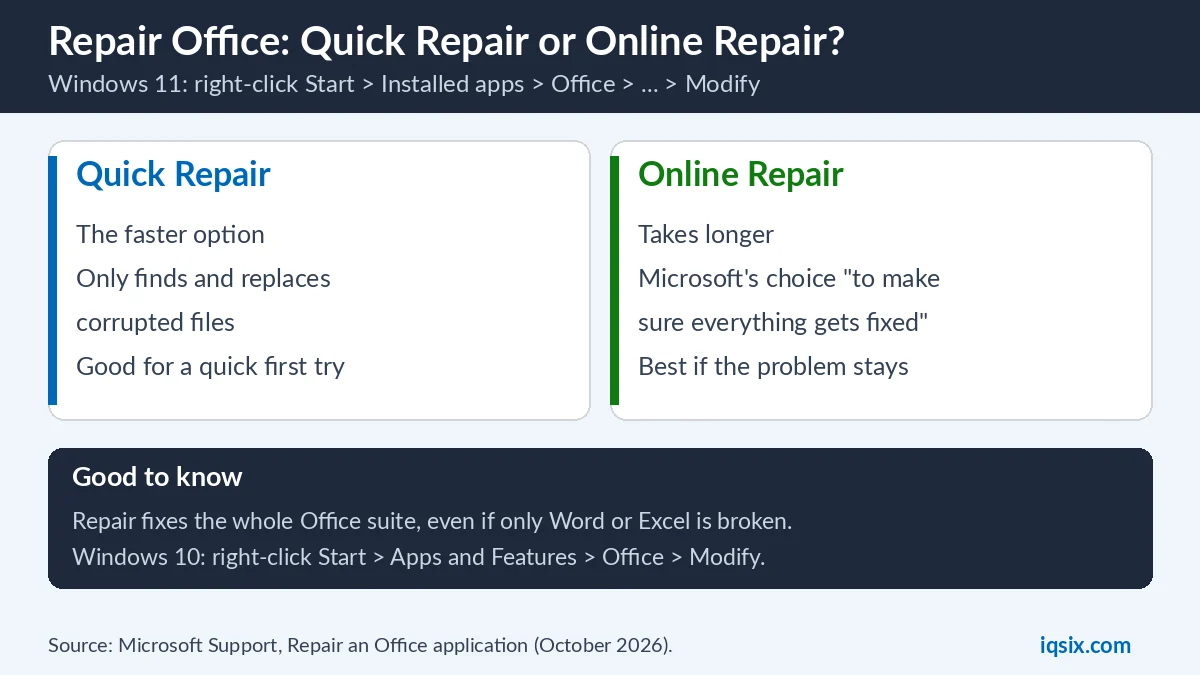
If Word, Excel or Outlook won’t open or keeps crashing, Microsoft says restarting the app sometimes fixes it. If not, repair Office (Microsoft Support):
On Windows 11
- Right-click the Start button and select Installed apps.
- Find Microsoft 365 or Office, select the three dots (…) and choose Modify.
- In the window “How would you like to repair your Microsoft 365 and Office Programs”, choose Quick Repair or Online Repair, then select Repair.
- Follow the steps on the screen. You might need to restart your PC when it is done.
On Windows 10
Right-click Start, select Apps and Features, select your Office product and choose Modify. The repair options are the same.
Which one should you pick? Microsoft’s choice is Online Repair, “to make sure everything gets fixed”. Quick Repair is faster, but it only detects and replaces corrupted files. A simple plan: try Quick Repair first, and run Online Repair if the problem is still there.
Two more things from Microsoft: the repair covers the whole Office suite, even if only Word or Excel has a problem. And on an MSI install you choose Change your installation > Repair > Continue instead.
Windows itself acting up too, not just Office? Windows has its own repair tools: see DISM and SFC /scannow.
Word crashed before you could save? See how to recover an unsaved Word document.
How to update Office, and undo a bad update
- Open an Office app such as Word and create a new document.
- Select File > Account (Office Account in classic Outlook).
- Under Product Information, select Update Options > Update Now. No Update Now? Select Enable Updates first.
- Close the “You’re up to date!” or “Updates were installed” window when it is done.
The same Update Options button lets you Disable Updates or View Updates that are already installed (Microsoft Support). No Update Options button at all? Then you have a volume license install or Group Policy controls updates: Microsoft says to try Microsoft Update or ask your company help desk. If Office won’t open, repair it first.
Did an update break something?
Microsoft documents a way back to an earlier version for Microsoft 365, Office 2024 and Office 2021 installed with Click to Run (not MSI). In short (Microsoft Support):
- Find the earlier version number on Microsoft’s update history page for Microsoft 365 Apps.
- Download the free Office Deployment Tool and save a file called config.xml next to its setup.exe, with this line inside a Configuration tag:
<Updates Enabled="TRUE" TargetVersion="16.0.xxxxx.yyyyy" />(your version number in place of the x and y). - Open Command Prompt as administrator, go to that folder and run
setup.exe /configure config.xml. Then select Update Options > Update Now in an Office app. - Select Update Options > Disable Updates so Office doesn’t update straight back, and set a reminder to turn updates on again later.
Do this only for a serious problem: the latest update carries security, performance and reliability fixes.
Two kinds of Office on the same PC
- Same version, two technologies: not supported. Microsoft says you can’t have the same version of Office installed with Click to Run and with MSI on one computer. This also applies to standalone apps like Access, Visio, Project, Skype for Business or OneDrive for Business (Microsoft Support).
- The fix: uninstall the MSI version of Office, then try your installation again. Or keep the MSI version and don’t install the other one.
- Microsoft 365 plus an older Office, such as Office Home and Business 2021: in most cases they can’t run together on one PC. The exception is when one of the two is an MSI install (Microsoft Support).
- Keeping two versions anyway? Install the older one first, and use only 32-bit or only 64-bit Office: Microsoft says you can’t mix both.
How to uninstall Office completely
Uninstalling Office removes Click to Run with it. Microsoft gives these ways:
- Control Panel: press the Windows key, type control panel and open it. Select Programs > Programs and features, select your Microsoft 365 or Office product and choose Uninstall.
- Uninstall troubleshooter: Microsoft’s tool on its uninstall page removes Microsoft 365, Office 2021, Office 2019 and Office 2016. It can’t uninstall Office 2024 at the moment, and it needs Windows 10 or later.
- Microsoft Store installs: uninstall from Settings. If that fails, Microsoft gives this PowerShell command (run as administrator):
Get-AppxPackage -name "Microsoft.Office.Desktop" | Remove-AppxPackage
In most cases you can’t uninstall just one app, say only Access, from a Microsoft 365 suite: Microsoft says that only works for apps bought on their own. Your documents stay on the PC. Installing Office again later? Our guide on how to redeem a Microsoft 365 product key shows where to download it from your Microsoft account.
Which Office versions use Click to Run?
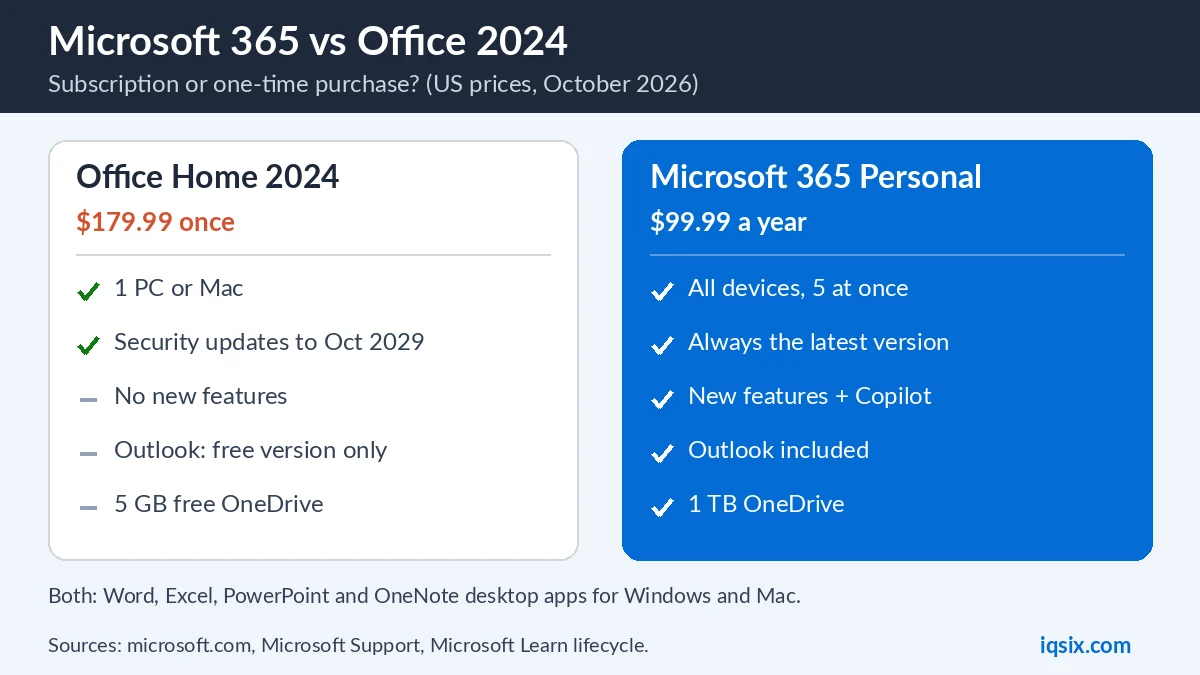
Click to Run is used by Microsoft 365 (Personal, Family and the business plans) and by the one-time versions Office 2024, Office 2021 and Office 2019. Microsoft’s help pages on it cover all of them, and Microsoft says MSI was only used for volume license editions of Office 2016 and older.
Choosing a version? Office 2021 support ended on 13 October 2026, so it no longer gets security fixes. Compare the current options in Microsoft 365 vs Office 2024, and see Microsoft 365 Personal vs Family if you want to share with your family.
Get Microsoft 365 from IQSIX

IQSIX sells a Microsoft 365 Personal 1-year key. It installs with Click to Run like any Microsoft 365, so everything in this guide applies to it.
- Redeem: enter the key at microsoft365.com/setup with your Microsoft account, then install Office (see how to redeem a Microsoft 365 product key).
- Devices: install it on all your devices and stay signed in on 5 at the same time (how many devices can use Microsoft 365).
- Delivery: by email after your payment is confirmed (or on WhatsApp if you ask).
- Payment: crypto, card, or a Remitly bank or mobile money transfer at checkout.
- Questions first? Ask us on WhatsApp or through our contact page.
Need Windows or antivirus too? See all our software keys.
Microsoft Office Click to Run FAQ
Is Microsoft Office Click to Run a virus?
No. Click to Run is Microsoft’s own technology for installing and updating Office. If you see it, Office or Microsoft 365 is installed on the PC. If you don’t use Office, uninstall Office and Click to Run goes with it.
Can I uninstall Microsoft Office Click to Run?
Only by uninstalling Office: use Control Panel > Programs and features, or Microsoft’s uninstall troubleshooter (it can’t remove Office 2024 yet). Your documents are not deleted.
How do I stop Click to Run updates?
Open an Office app, go to File > Account > Update Options and select Disable Updates. Microsoft advises turning them back on later, because updates include security fixes.
Why is Click to Run using so much CPU?
Click to Run works in the background when it downloads and installs Office updates. Let the update finish (Update Options > Update Now), restart the PC, and if it stays busy, run a Quick Repair, then an Online Repair.
Is Office 2021 Click to Run?
Yes. Office 2021, Office 2024 and Microsoft 365 install with Click to Run; Microsoft says MSI was only used for volume license editions of Office 2016 and older. Note that Office 2021 support ended on 13 October 2026.
Should I use Quick Repair or Online Repair?
Quick Repair is faster but only detects and replaces corrupted files. Online Repair takes longer and is Microsoft’s choice to make sure everything gets fixed. Try Quick Repair first; if the problem stays, run Online Repair.
Sources, checked 30 October 2026: Microsoft Support – Repair an Office application, How to update Microsoft 365 or Office for Windows, Uninstall Microsoft 365 or Office from a PC, What version of Office am I using?, Office installed with Click-to-Run and Windows Installer on same computer isn’t supported, Install and use different versions of Office on the same PC, How to revert to an earlier version of Office and Office 2010 Click-to-Run: Introduction; Microsoft Learn – Overview of update channels for Microsoft 365 Apps. Office menus can change after updates. IQSIX is not affiliated with Microsoft.