
Short answer: yes, Minecraft is cross platform, with one rule: you can only play with people on the same edition. Bedrock Edition on Xbox, PlayStation, Nintendo Switch, Windows 10 and 11 and phones plays with every other Bedrock device. Java Edition on Windows, Mac and Linux only plays with Java. Java and Bedrock players can’t play together (minecraft.net).
This guide explains Minecraft cross platform play device by device, the Java vs Bedrock rule, what you need for Minecraft crossplay (a free Microsoft account and, on consoles, an online subscription), how to sign in on PlayStation and Switch, and the easiest way to play together: Realms. The facts come from minecraft.net, checked in October 2026.
- Bedrock crossplay: Xbox, PS5, PS4, Switch, Switch 2, Windows 10/11 and mobile
- Java crossplay: Windows, Mac and Linux
- Java with Bedrock: not possible
- You need: a free Microsoft account
- On consoles: Game Pass, PlayStation Plus or Nintendo Switch Online
Table of Contents
Is Minecraft cross platform? Device by device
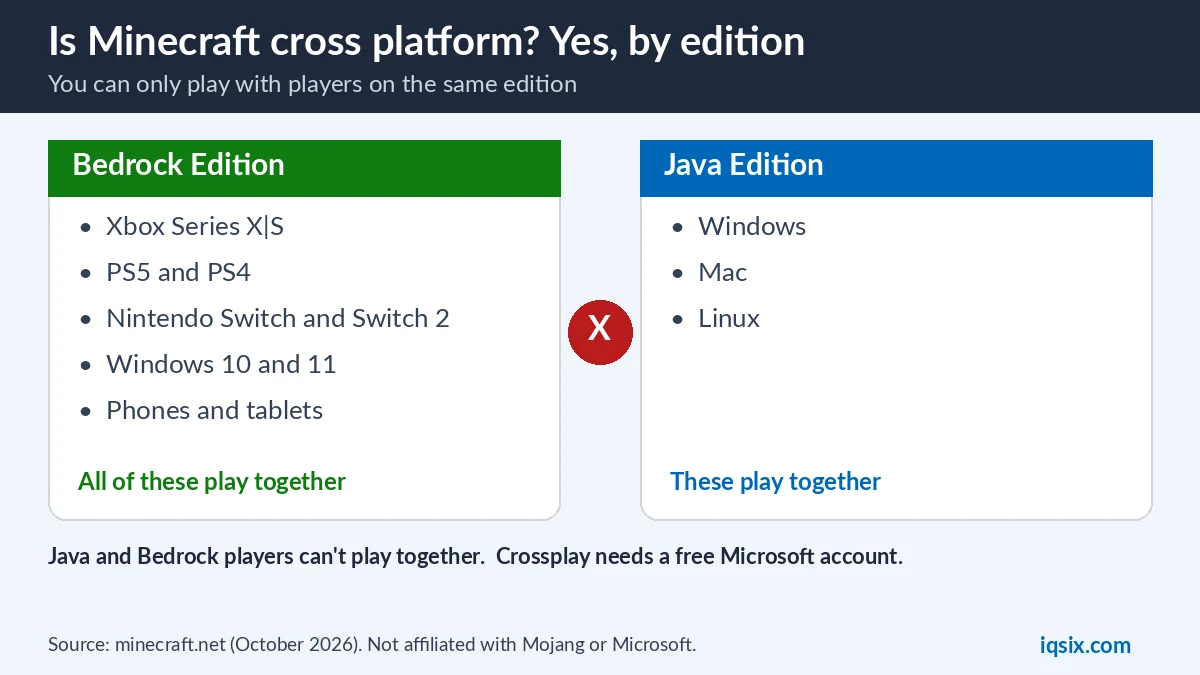
Find your device in the first column. The last column shows who you can play with online:
| Your device | Minecraft edition | Crossplay with |
|---|---|---|
| Xbox Series X|S, Xbox One | Bedrock | PS5, PS4, Switch, Switch 2, Windows 10/11 (Bedrock) and mobile |
| PS5, PS4 | Bedrock | Xbox, Switch, Switch 2, Windows 10/11 (Bedrock) and mobile |
| Nintendo Switch, Switch 2 | Bedrock | Xbox, PS5, PS4, Windows 10/11 (Bedrock) and mobile |
| Windows 10/11 PC | Bedrock and Java (both included) | Bedrock: consoles and mobile. Java: Mac and Linux |
| Mac, Linux | Java | Windows, Mac and Linux players on Java |
| Android, iOS | Bedrock | Consoles and Windows 10/11 (Bedrock) |
So PS4 and PS5 players can play together, a Switch player can join friends on Xbox, and a phone can join a PC, as long as everyone uses Bedrock. Minecraft on a Mac is Java Edition, so a Mac can’t join friends on consoles (minecraft.net).
Minecraft Java vs Bedrock: the crossplay rule
This is the main Minecraft crossplay rule. Both editions have online multiplayer, but they use different servers. Minecraft says this means Java and Bedrock players can’t play together, so ask your friends which version they have before you start (minecraft.net).
- Bedrock Edition: crossplay with Bedrock players on any platform. It has controller and touch support, the Minecraft Marketplace and add-ons.
- Java Edition: plays only with other Java players on Windows, Mac and Linux. It has no native controller support and is known for mods and third-party servers.
On a Windows 10 or 11 PC you don’t have to choose: Minecraft: Java & Bedrock Edition for PC includes both editions (minecraft.net). Start Bedrock to play with friends on consoles and phones, and Java to play with friends on a Mac or Linux PC. Minecraft adds that you still have to switch between the editions, depending on who you want to play with.
What you need for Minecraft crossplay
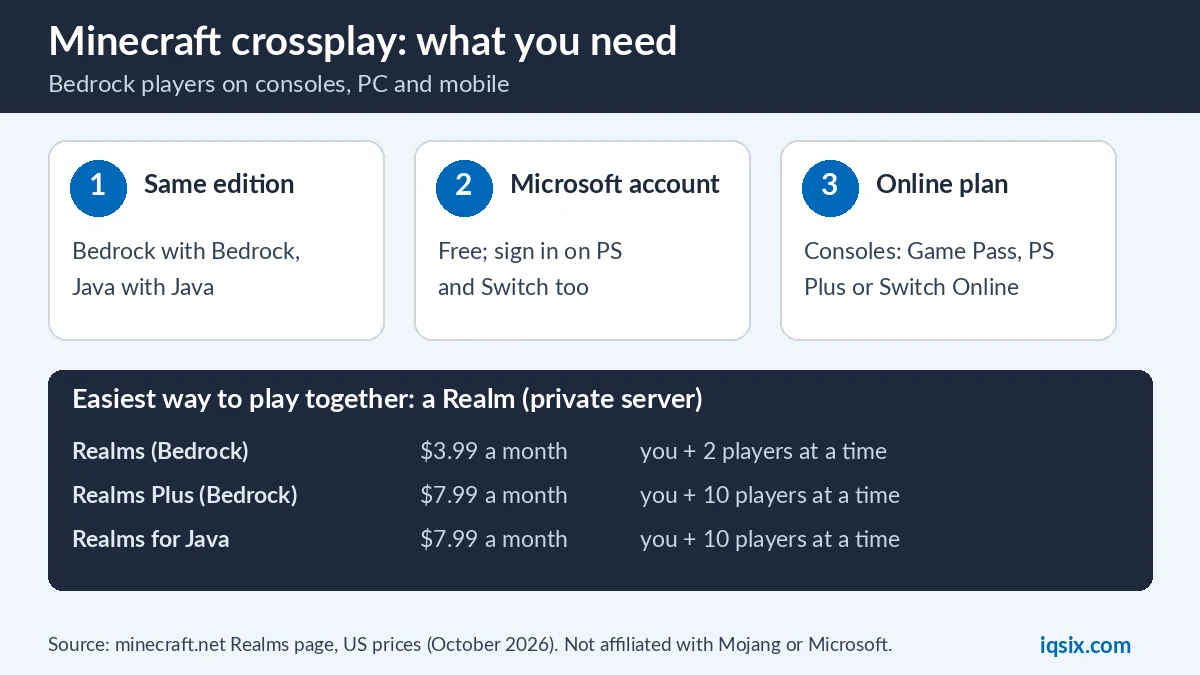
- The same edition as your friends: Bedrock with Bedrock, Java with Java.
- A free Microsoft account: Minecraft says cross platform play requires a Microsoft account, also on Nintendo Switch (minecraft.net). Microsoft accounts are free to set up and use on any Minecraft device.
- On consoles, an online subscription: Minecraft says multiplayer on consoles requires the platform’s own online subscription, sold separately (minecraft.net). That is PlayStation Plus on PS5 and PS4, Nintendo Switch Online on Switch, and on Xbox a Game Pass plan (Essential, Premium and Ultimate all include online multiplayer).
- On PC: Minecraft says the only thing you need to play online is an internet connection.
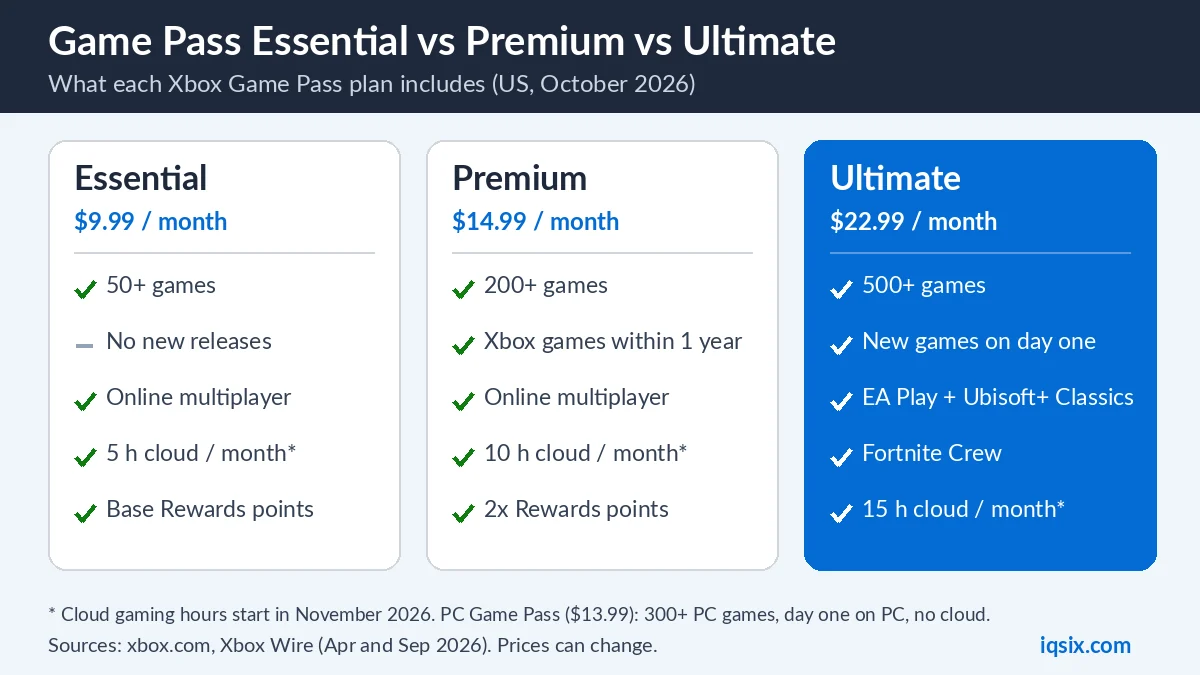
Choosing a plan? Compare Game Pass Essential vs Premium vs Ultimate, PS Plus Essential vs Extra vs Premium and Nintendo Switch Online with an eShop card.
Children under 13 need a parent’s permission to finish setting up a Microsoft account. Parents can also choose whether a child or teen account may join multiplayer games, receive invitations, chat, or buy packs and Realms (minecraft.net). For money, see our guides to spending limits on Xbox, PS5 and Nintendo Switch.
How to sign in with a Microsoft account on PlayStation and Switch
Minecraft’s steps are the same on PS5, PS4 and Nintendo Switch (minecraft.net):
- In Minecraft, select Sign in with a Microsoft account.
- On another device, such as your phone, open the web address shown in Minecraft, enter the code shown in the game and select Next.
- Enter the email address, phone number or Skype name of your Microsoft account and select Next.
- Enter your password and select Sign in.
- Minecraft shows a welcome message. Select Let’s play!
On Xbox, Minecraft signs in automatically with the gamertag of your current Xbox profile. On Windows, it signs in with the gamertag you used to buy the game, and you can switch accounts in the Xbox app. No Microsoft account yet? In Minecraft, select Sign in and follow the steps: email address, password, country or region and birth date, then the verification code Microsoft sends you by email.
How to play Minecraft cross platform with friends
Once everyone is on Bedrock and signed in with a Microsoft account, Minecraft offers these ways to play together online (minecraft.net):
- Realms: a private server run by Minecraft and always online. Friends join your Realm from any Bedrock device, even when you are offline (details below).
- Featured servers: Bedrock Edition has a list of featured servers that require a Microsoft account to join.
- Your own server: on both editions you can also create your own multiplayer server.
Want to play Bedrock on a PC with a controller? Bedrock has controller support. See how to connect a PS4 controller to a PC, a phone, a PS4 or a PS5.
Realms: the easiest Minecraft crossplay server
| Plan | Edition | Price (US) | Players at once | Crossplay on |
|---|---|---|---|---|
| Realms | Bedrock | $3.99 a month | You + 2 | Android, iOS, Windows, Amazon Fire, Xbox, PlayStation, Nintendo, Chromebook |
| Realms Plus | Bedrock | $7.99 a month | You + 10 | The same devices, plus the Marketplace Pass catalog |
| Realms for Java | Java | $7.99 a month | You + 10 | Windows, Mac and Linux |
Every Realm is a personal server available 24/7, with three world slots and free backups. You can invite as many friends as you like (Minecraft lists 10,000), and your friends play for free: only the number of players online at the same time is limited. New Realms subscribers get a one-month trial, and the subscription then renews at the current monthly price unless you cancel (minecraft.net).
Realms work within one edition, like all Minecraft crossplay: a Bedrock Realm is for Bedrock players on every device, and a Java Realm is for Java players.
Minecraft crossplay not working? Check these
If Minecraft cross platform play doesn’t work, go through this list:
- Same edition? A Java player can’t join a Bedrock world, and the other way around. On PC, check which edition you started.
- Signed in? Every player needs to be signed in with a Microsoft account, also on PlayStation and Switch.
- Online plan active? On consoles, check that your Game Pass, PlayStation Plus or Nintendo Switch Online membership is active.
- Privacy settings: for Realms, Minecraft says your device privacy settings must allow Minecraft to communicate over the internet, with the Clubs and Multiplayer settings both set to Allowed (minecraft.net).
- Child account? A parent may need to allow multiplayer games and invitations for that account.
- Test versions: Java snapshots can’t be used on Realms, and Android beta players can’t use Realms or join players who aren’t on the beta. Minecraft Preview is a separate app (minecraft.net).
Your Minecraft purchases on other devices
Minecraft says a free Microsoft account helps you access your purchases, Realms and other Minecraft content across all your Minecraft devices (minecraft.net). It names one exception: Minecoins bought in Minecraft on a Nintendo device must be used in the Nintendo ecosystem (minecraft.net).
New computer? You don’t need to buy Minecraft again for a new PC. Download the Minecraft Launcher, sign in with the Microsoft account you used to buy the game, and install it from your library.
Pay for console games and online plans with a gift card

Minecraft crossplay on consoles needs an online plan. No credit card, or want to limit spending? A gift card adds money to the console account you play Minecraft on:
- PlayStation: a PSN gift card adds funds to your PlayStation wallet for games, add-ons and PlayStation Plus. See how to redeem a PSN gift card.
- Nintendo Switch: a Nintendo eShop card adds funds for games and Nintendo Switch Online. See Nintendo Switch Online with an eShop card.
- Xbox: Game Pass Ultimate includes online multiplayer on Xbox console.
IQSIX codes are for US accounts, so check your account region before you buy: how to check your account region. Delivery is by email after your payment is confirmed, and you can pay with crypto, card, or a Remitly bank or mobile money transfer.
Minecraft cross platform FAQ
Is Minecraft cross platform between PS4 and PC?
Yes, with Bedrock Edition on Windows 10 or 11. PlayStation runs Bedrock, so it plays with Bedrock on PC, but not with Java Edition.
Can Java and Bedrock players play together?
No. Minecraft says the two editions use different servers, so Java and Bedrock players can’t play together. On a Windows PC you get both editions and can switch between them.
Is Minecraft cross platform on Nintendo Switch?
Yes. Minecraft on Switch and Switch 2 is Bedrock Edition and plays with Xbox, PlayStation, Windows 10/11 and mobile. You need a free Microsoft account and a Nintendo Switch Online membership for online play.
Do I need a Microsoft account for Minecraft crossplay?
Yes. Minecraft says cross platform play requires a Microsoft account. It is free, and you can sign in with it on PlayStation and Switch too.
Can PS5 and Xbox play Minecraft together?
Yes. Both run Bedrock Edition, so PS5 and Xbox players can play together online with a Microsoft account and their console’s online subscription.
How many friends can play on a Minecraft Realm?
On Bedrock, Realms allows you plus 2 players at once and Realms Plus you plus 10. Realms for Java allows you plus 10. You can invite many more friends; only the number playing at the same time is limited.
Sources, checked 29 October 2026: minecraft.net store FAQ, Minecraft: Java & Bedrock Edition for PC, The Difference between Java and Bedrock Editions, Realms and Realms Plus and Minecraft and Microsoft accounts. Prices are US prices and can change. IQSIX is not affiliated with Mojang or Microsoft.