
Short answer: Windows activation errors fall into a few groups: the product key is wrong or already used, the key is for a different edition, your hardware changed, or Windows can’t reach Microsoft’s activation servers. Start with Start > Settings > System > Activation > Troubleshoot, then look up your code in the tables below. Every fix here comes from Microsoft’s page Get help with Windows activation errors, checked in October 2026.
This guide lists all 47 Windows activation error codes on that page, for Windows 11 and Windows 10, sorted by cause. For each code you see what it means and what to do, in plain words.
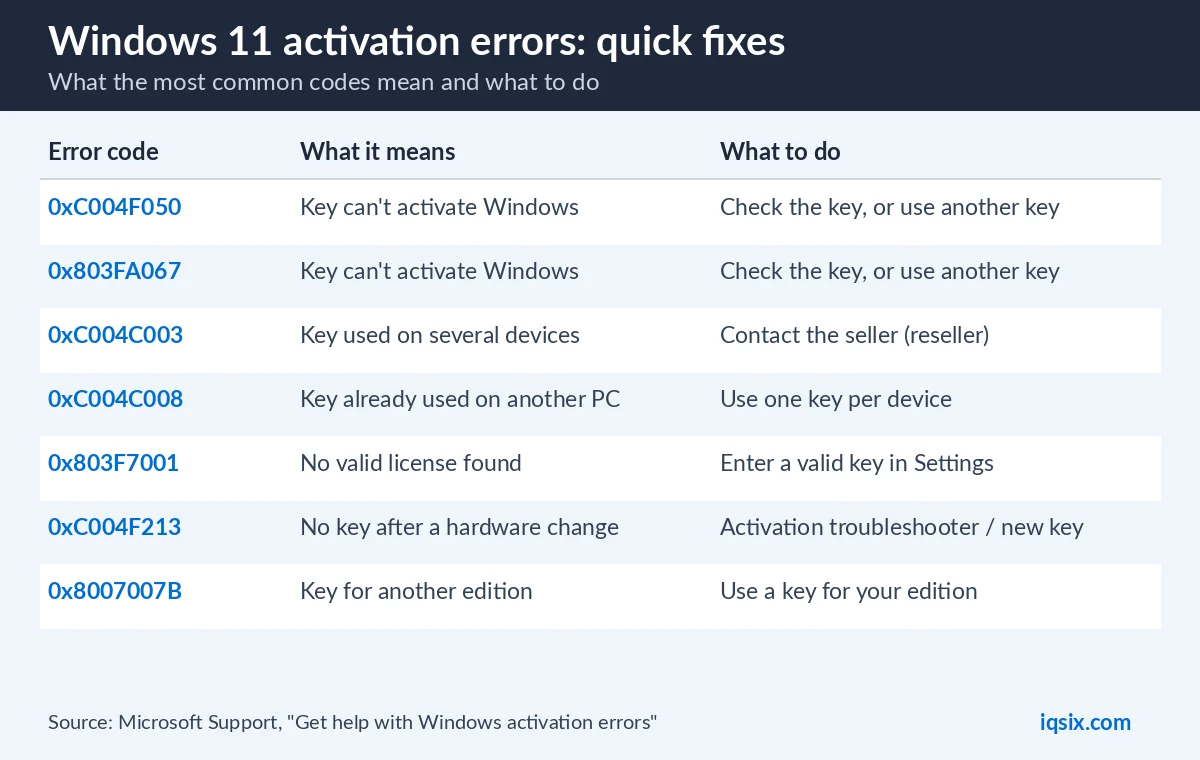
- Wrong or used key: 0xC004C003, 0xC004C008, 0xC004F050
- Wrong edition: 0xC004F212, 0xC004F074, 0x8007007B
- Hardware change: 0xC004F211, 0xC004F213, 0x803F7001
- Connection or server: 0xC004FC03, 0x8007267C, 0x80072F8F
- First fix for all: the Activation troubleshooter
Table of Contents
Windows activation errors: what to do first

Microsoft gives the same first steps for all Windows activation errors:
- Check that Windows is up to date. Type winver in the search box on the taskbar and select it to see your version and build.
- Run the Activation troubleshooter. Open Start > Settings > System > Activation and select Troubleshoot. On Windows 11, Microsoft also offers it in the Get Help app.
- Look up your code in the tables below and follow the steps.
- Check the code again. Microsoft says the error code and message can change after you run the troubleshooter or try to activate. If it changed, look up the new code.
Where do you see the code? On the Activation page, next to Activation status. On Windows 10, the page is in Start > Settings > Update & Security > Activation. The codes and fixes are the same on Windows 11 and Windows 10.
Product key errors: invalid or already used key
These Windows activation error codes mean Windows can’t use the product key you entered:
| Error code | What it means | What to do |
|---|---|---|
| 0xC004C003 | The key isn’t valid. Microsoft says product keys are unique, for one device: a key used, or tried, on several devices is marked as not valid. | Use a different key for this PC. Bought the PC from a Windows reseller and expected the key to work? Contact the reseller. New PC with Windows preinstalled? Contact the manufacturer. |
| 0xC004C008, 0xC004C770, 0x803FA071 | The key is already used on another device, or on more devices than the Microsoft Software License Terms allow. | Get a key for each PC. After a big hardware change with a valid key, try phone activation (below). |
| 0xC004F050, 0xC004C060, 0xC004C4A2, 0x803FA067L, 0xC004C001, 0xC004C004, 0xC004F004, 0xC004C007, 0xC004F005, 0xC004C00F, 0xC004C010, 0xC004C00E, 0xC004C4A4, 0xC004C4A5, 0xC004B001, 0xC004F010 | The key can’t be used to activate Windows. After an upgrade, the activation servers may also have been busy. | Enter a different key or buy a new one. After an upgrade, wait a while and select Activate again. |
| 0x800704CF | Windows found no valid license for this device. | Enter a valid 25-character key with Change product key. After a hardware change, run the troubleshooter. |
| 0xC004C020 | A volume license, bought by an organization, is used on more devices than allowed. | Contact your organization’s support person. |
Microsoft says your product key is usually in the confirmation email you got when you bought Windows, in the packaging of your device, or on the Certificate of Authenticity (COA) sticker on the back or bottom of the PC. Lost it? See how to find your Windows product key.
Wrong edition errors: the key doesn’t match your Windows
A product key only activates the edition it is made for. Microsoft’s example: a key for Windows 11 Enterprise can’t activate Windows 11 Home. These Windows activation error codes point to an edition problem:
| Error code | What it means | What to do |
|---|---|---|
| 0xC004F212 | The key isn’t compatible with this edition. It often happens after a reinstall where a different edition was chosen. | Run the troubleshooter: if it finds a digital license for another edition, it tells you how to install the right one. |
| 0xC004F210 | The key is for a different edition, or the installed edition doesn’t match your digital license. | Enter a key for the installed edition, or reinstall the edition your license is for. |
| 0xC004E016 | The key is for a different version or edition of Windows. | Use a key that matches your Windows, or buy Windows in the Microsoft Store. |
| 0xC004F00F | An Enterprise key was entered on Windows 11 Home or Pro. | Enter a key for your edition. |
| 0xC004F034 | The key isn’t valid, or it is for a different version of Windows. | Enter a valid key for your version and edition. On a company network with a KMS server, ask your IT team. |
| 0x8007232B, 0xC004F074, 0xC004F038, 0x8007007B | An Enterprise key on Windows 11 Home or Pro, or a work PC that isn’t connected to the workplace network. | Use a key for your edition. Work PC: connect to the work network or ask IT. Otherwise, type your 25-character key again with Change product key. |
The Activation page shows your edition, for example Windows 11 Home or Windows 11 Pro. Reinstalling? Choose the edition your license is for: see how to download Windows 11 Pro and Windows 11 Pro vs Pro N. Not sure which edition you need? Read Windows 11 Home vs Pro.
Hardware change errors: new motherboard or no key found
Microsoft says a Windows license is linked to your device hardware. A significant change, like a new motherboard, can stop Windows from finding a matching license when the PC restarts:
| Error code | What it means | What to do |
|---|---|---|
| 0xC004F211 | Windows reported that the hardware of your device has changed. | Open the Activation page and select Troubleshoot. If it can’t fix it, use its link to reactivate after a hardware change. |
| 0xC004F213 | Windows reported that no product key was found on your device. | Enter the key you used before the change with Change product key, or buy a new license. |
| 0x803F7001 | No valid Windows license was found to activate this device. | Enter a valid 25-character key with Change product key, or buy a digital license in the Microsoft Store. |
If Windows came preinstalled on your PC and you replaced the motherboard, Microsoft says you may need to buy a new license. There is also an exception path to move your license: be signed in with the same Microsoft account before you change the hardware, then select Troubleshoot on the Activation page. If the troubleshooter can’t fix it, it shows a link to reactivate after a hardware change (Microsoft Support). Microsoft adds that the edition must be the same before and after the change.
Connection and server errors
Some Windows activation error codes have nothing to do with your key. Windows simply can’t reach the activation service, or the service is busy:
| Error code | What it means | What to do |
|---|---|---|
| 0xC004FC03 | No internet connection, or the firewall blocks online activation. | Connect to the internet and check the firewall. Still failing? Activate by phone (below). |
| 0x8007267C | Not connected to the internet, or the activation server is temporarily unavailable. | Check the connection and that the firewall doesn’t block Windows. |
| 0x80072F8F | The date and time on the PC are wrong, or Windows can’t reach the activation service to check the key. | Fix the date in Settings > Time & language > Date & time, run the network troubleshooter, then restart. |
| 0xD0000272, 0xC0000272, 0xC004C012, 0xC004C013, 0xC004C014 | The activation server is temporarily unavailable. | Wait. Microsoft says Windows activates automatically when the service is back online. |
| 0xC004E028 | The device is already in the process of activation. | Wait for the first request to finish. |
| 0x87E10BC6 | A problem with Microsoft’s activation server or licensing service. | Wait a few minutes, run the troubleshooter, then select Go to Microsoft Store (Try again if it shows a problem). |
Other Windows activation errors
| Error or message | What it means | What to do |
|---|---|---|
| 0xC004E003 | Third-party software changed system files that activation needs. | Restore the PC to an earlier restore point. It removes apps installed after that point but keeps your personal files. |
| 0x80004005 | Microsoft gives no specific cause for this code. | Run the Activation troubleshooter. If that doesn’t work, you might need to reset your device. |
| 0x80070652 | Update components are missing or corrupted, or the network connection is poor. | Run the Windows Update troubleshooter and check your internet connection. |
| “Your Windows License Will Expire Soon” | A volume license client is installed, common on company PCs. | Contact your system administrator. |
| Any other code | Not in Microsoft’s list of common errors. | Search for the code in Windows Help, or contact Microsoft support. |
How to activate Windows by phone (SLUI 04)
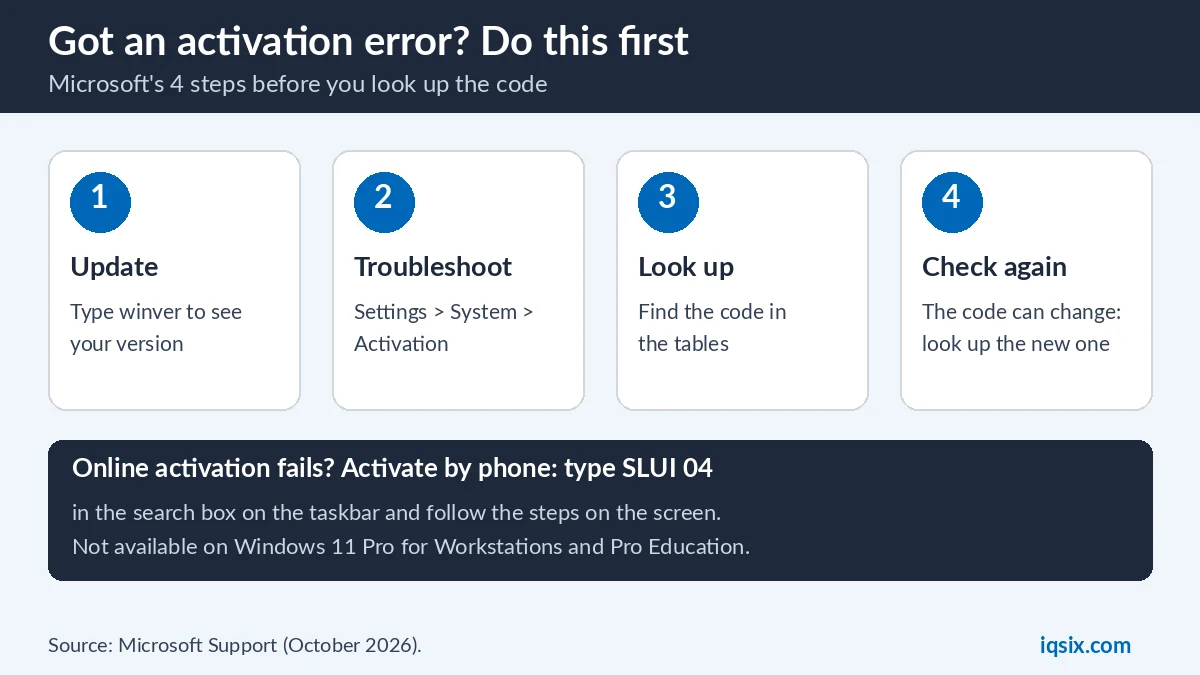
Microsoft suggests phone activation when online activation fails, for example with error 0xC004FC03, or when you have a valid key after a big hardware change:
- In the search box on the taskbar, type SLUI 04.
- Select SLUI 04 from the list of results.
- Follow the instructions on the screen to activate Windows.
Phone activation can’t be used on Windows 11 Pro for Workstations and Windows 11 Pro Education: Microsoft says these editions must activate over the internet. More about that edition in Windows 11 Pro for Workstations vs Pro.
Still not activated? What to do next
- Read the Activation status again and write down the exact code: it may have changed.
- Bought from a reseller? Microsoft says to contact the reseller if you expected the key to be valid.
- New PC with Windows preinstalled? Contact the device manufacturer.
- Code not listed? Contact Microsoft support.
- “Activate Windows” text still on screen? See how to remove the Activate Windows watermark. Avoid activator tools and registry tricks: they don’t activate Windows.
- Got your key from IQSIX? Send a screenshot of the Activation page on WhatsApp and we help you (Windows + Shift + S captures part of the screen: see how to take a screenshot on Windows).
Moving from Windows 10? The fixes are the same. Windows 10 support ended on 14 October 2025, so check how to upgrade Windows 10 to Windows 11. For the full activation steps, read how to activate Windows 11 Pro.
Get a Windows 11 Pro key from IQSIX

Many Windows activation errors end with “use a valid key for your edition”. IQSIX sells a Windows 11 Pro product key for one PC. Enter it in Start > Settings > System > Activation > Change product key.
- Delivery: by email after your payment is confirmed (or on WhatsApp if you ask).
- Edition: a Windows 11 Pro key activates Windows 11 Pro. On Windows 11 Home, you can use it to upgrade to Pro (see Home to Pro).
- Payment: crypto, card, or a Remitly bank or mobile money transfer at checkout.
- Help: send us your error code on WhatsApp or through our contact page before you buy.
Need Office or antivirus too? See all our software keys.
Windows activation errors FAQ
What does error 0xC004F074 mean?
Microsoft lists 0xC004F074 with 0x8007232B, 0xC004F038 and 0x8007007B: an Enterprise key was entered on Windows 11 Home or Pro, or a work PC can’t reach the workplace network. Use a key for your edition, or ask your IT team.
How do I fix error 0x803F7001?
It means no valid Windows license was found for the PC. Open Settings > System > Activation, select Change product key and enter a valid 25-character key, or buy a digital license in the Microsoft Store.
What is error 0xC004C003?
The product key isn’t valid. Microsoft says a key used, or tried, on several devices is marked as not valid. Use a key that is unique to your PC, or contact the seller.
Why does Windows say my product key is already in use?
Errors 0xC004C008, 0xC004C770 and 0x803FA071 mean the key is used on another device, or on more devices than the license terms allow. You need a key for each PC.
Do I need a new key after replacing my motherboard?
Maybe. Microsoft says that if Windows came preinstalled and you replaced the motherboard, you may need a new license. If your license is linked to your Microsoft account, first try Troubleshoot and the link to reactivate after a hardware change.
How do I activate Windows by phone?
Type SLUI 04 in the search box on the taskbar, select it and follow the instructions. Phone activation is not available on Windows 11 Pro for Workstations and Pro Education.
Sources, checked 29 October 2026: Microsoft Support: Get help with Windows activation errors (Windows 11 and Windows 10), Activate Windows and Reactivating Windows after a hardware change. Windows menus can change after updates.