
Short answer: Windows 11 Pro for Workstations is Windows 11 Pro plus four extras for high-end hardware: support for up to 4 CPUs and 6 TB of memory, persistent memory, SMB Direct for fast network file sharing, and the Resilient File System (ReFS). Microsoft sells Windows 11 Pro for Workstations for $309.00 and Windows 11 Pro for $199.99 in its US store (Microsoft Store). Unless your PC has server-class hardware, Windows 11 Pro is the edition you need.
This guide compares Windows 11 Pro for Workstations with Windows 11 Pro (and Home), explains each extra in plain language, shows who really needs it and how to move from Pro to Pro for Workstations. Everything comes from Microsoft and Microsoft Learn, checked in October 2026.
- What it adds: up to 4 CPUs and 6 TB of memory, persistent memory, SMB Direct, ReFS
- Memory limits: Home 128 GB · Pro 2 TB · Pro for Workstations 6 TB
- Price (Microsoft Store, US): Pro $199.99 · Pro for Workstations $309.00
- Upgrade: Pro to Pro for Workstations with a product key, no restart needed
- Our advice: Windows 11 Pro for almost every home, office and gaming PC
Table of Contents
What is Windows 11 Pro for Workstations?
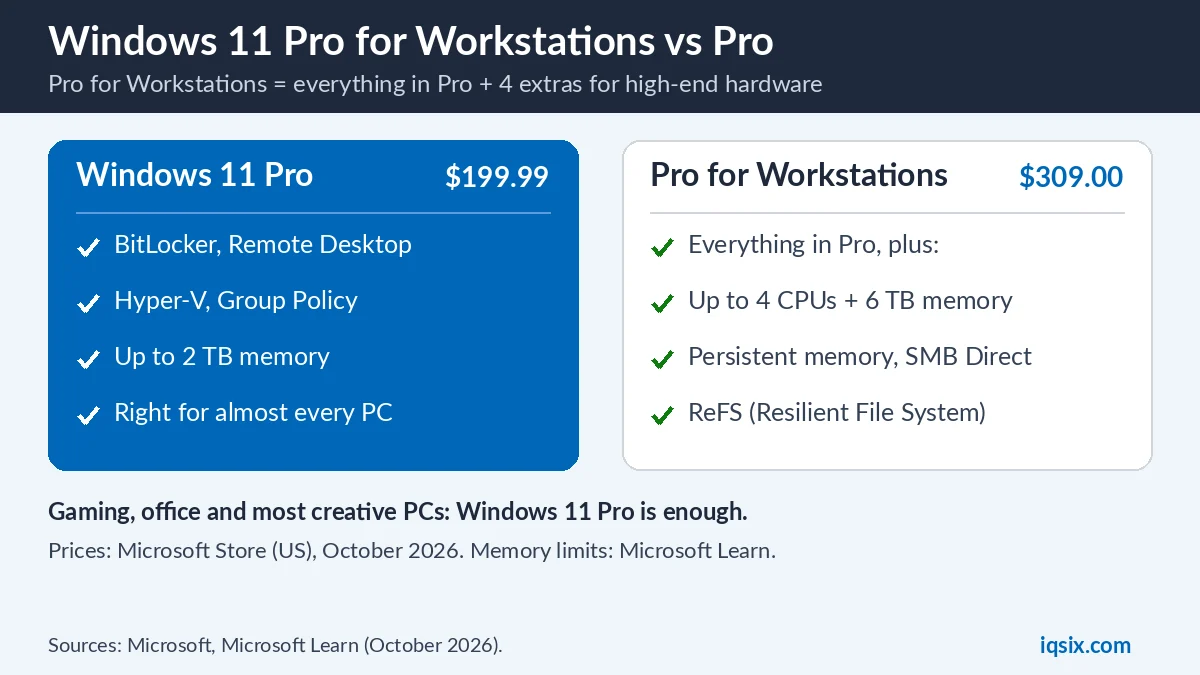
Windows 11 Pro for Workstations is an edition of Windows 11 made for powerful workstation PCs. Microsoft describes it as delivering all the capabilities of Windows 11 Pro plus a suite of tailored performance enhancements (Microsoft). On its Microsoft Store page, Microsoft says it is designed for projects such as intensive graphics work and massive data crunching.
Microsoft names the people it is built for: CAD professionals, animators, data scientists, graphic designers and media production teams. In other words, people whose PCs have very large amounts of memory, several processors or special storage and network hardware.
Windows 11 Pro for Workstations vs Pro vs Home: comparison
| Windows 11 Home | Windows 11 Pro | Windows 11 Pro for Workstations | |
|---|---|---|---|
| Maximum memory (x64) | 128 GB | 2 TB | 6 TB |
| Processors | – | – | Up to 4 CPUs |
| Pro features (BitLocker, Remote Desktop, Hyper-V, Group Policy) | No | Yes | Yes |
| Persistent memory (NVDIMM-N) | No | No | Yes |
| SMB Direct (RDMA network adapters) | No | No | Yes |
| Resilient File System (ReFS) | No | No | Yes |
| Microsoft Store price (US) | – | $199.99 | $309.00 |
Everything Windows 11 Pro adds over Home is also in Windows 11 Pro for Workstations. For the Home vs Pro differences, see Windows 11 Home vs Pro.

The 4 extras of Pro for Workstations, explained
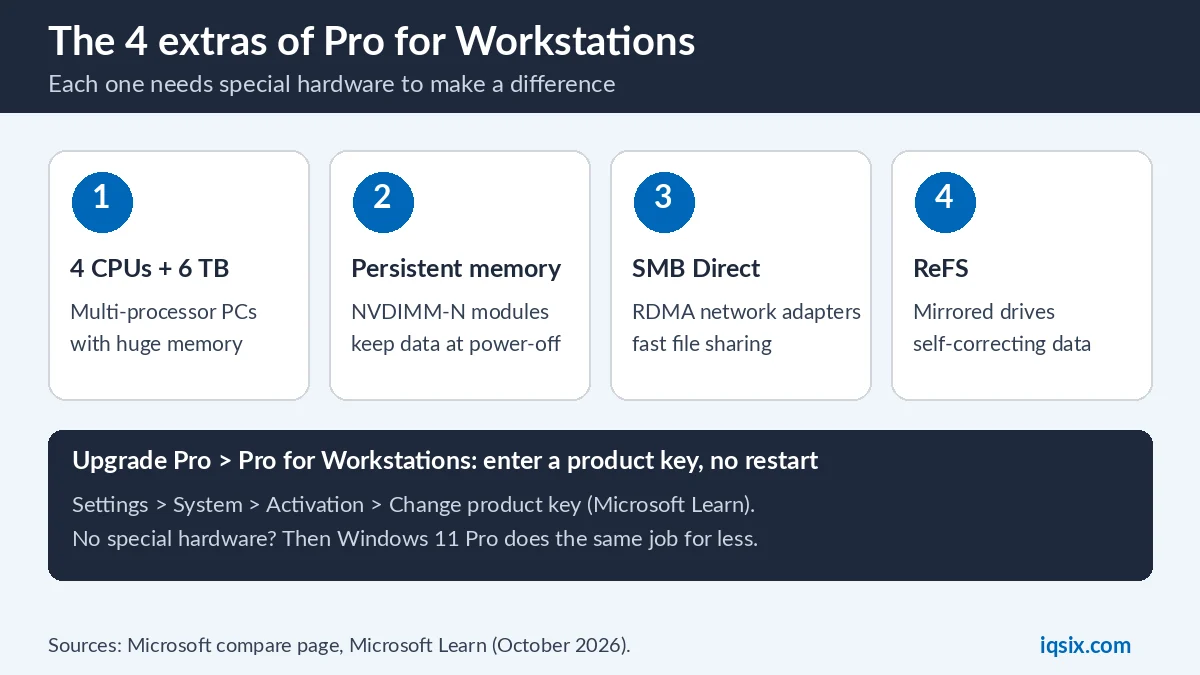
Here is what each extra does, in plain language, and which hardware it needs. Without that hardware, the extra has nothing to work with, which is why most people never notice a difference.
1. Up to 4 CPUs and 6 TB of memory
Microsoft’s store page says Windows 11 Pro for Workstations supports up to 4 CPUs and 6 TB of memory. Microsoft Learn lists the memory limits of each edition: 128 GB for Home, 2 TB for Pro and 6 TB for Pro for Workstations (Microsoft Learn). A normal desktop or laptop has one processor and far less than 2 TB of memory, so this extra only matters for big multi-processor workstations.
2. Persistent memory
Persistent memory is special memory hardware (NVDIMM-N modules) that keeps its data when the power goes off while working at memory speed. Microsoft says the support for persistent memory gives you lightning-fast data storage. You only benefit if your workstation has this kind of memory installed.
3. SMB Direct (fast file sharing)
SMB Direct speeds up file sharing over the network. Microsoft explains that by tapping into network adapters with Remote Direct Memory Access (RDMA) capability, Windows 11 Pro for Workstations enables top speeds with little latency (Microsoft). It needs RDMA network adapters, which are mostly found in servers and high-end workstations.
4. Resilient File System (ReFS)
ReFS is a file system made for data integrity. Microsoft’s description: it detects when data becomes corrupt on one of the mirrored drives and uses a healthy copy of your data on other drives to correct and protect data (Microsoft). It is useful for large storage pools with mirrored drives, not for a single SSD in a laptop.
Who needs Windows 11 Pro for Workstations?
You need Windows 11 Pro for Workstations only if at least one of these is true:
- Your PC has more than 2 TB of memory, or several physical processors.
- Your PC has persistent memory (NVDIMM-N) modules.
- You move large files over RDMA network adapters and want SMB Direct.
- You keep important data on mirrored drives and want ReFS.
If none of these applies, Windows 11 Pro gives you everything you will use, including BitLocker, Remote Desktop and Hyper-V, at a lower price. That covers gaming PCs, office desktops, laptops and most creative PCs. Microsoft markets Pro for Workstations for workloads like CAD, animation and data science, and none of its four extras is a gaming feature.
| Your PC | Pick |
|---|---|
| Gaming PC or laptop | Windows 11 Pro (or Home) |
| Office PC, freelancer, small business | Windows 11 Pro |
| Video or 3D workstation with normal hardware | Windows 11 Pro |
| Multi-CPU workstation, more than 2 TB memory, NVDIMM-N or RDMA | Windows 11 Pro for Workstations |
Windows 11 Pro for Workstations vs Enterprise
Windows 11 Enterprise has the same 6 TB memory limit as Windows 11 Pro for Workstations (Microsoft Learn), but it is a different product. Microsoft describes Enterprise as the edition for organizations with advanced security and management needs, and companies usually get it through their IT department. If you are a single professional with a powerful workstation, Windows 11 Pro for Workstations is the edition you can buy yourself.
Buying a new PC with Windows 11 Pro for Workstations
Many high-end workstations come with Windows 11 Pro for Workstations already installed. Microsoft says the devices powered by it combine innovative security solutions, high-end processors and graphics cards to tackle demanding workloads (Microsoft). If your new workstation already has it, you do not need a separate key: check the edition in Settings > System > About.
How to upgrade from Windows 11 Pro to Pro for Workstations
Microsoft Learn lists the supported edition upgrades. Moving from Windows 11 Pro to Pro for Workstations is supported by manually entering a product key, and no restart is required (Microsoft Learn). Moving from Home directly to Pro for Workstations with a product key is also supported, but needs a restart.
- Open Start > Settings > System > Activation.
- Next to Change product key, select Change.
- Enter your 25-character Windows 11 Pro for Workstations product key and select Next.
- Check the edition afterwards in Settings > System > About.
Because this is an edition upgrade, you do not reinstall Windows: your files, apps and settings stay where they are. Back up important files anyway, as before any big change.
Before you buy, note Microsoft’s warning on the store page: if your system was unable to install Windows 11 when offered the free upgrade because of the system requirements, you will not be able to install this version. Check the Windows 11 requirements first. The same steps with a Windows 11 Pro key upgrade Home to Pro: see our Windows 11 Pro activation guide.
Windows 11 editions and product keys
Every edition needs its own key: a Windows 11 Pro key activates Windows 11 Pro, and a Pro for Workstations key activates Pro for Workstations. Microsoft Learn also notes that each desktop edition has N versions without media features, such as Pro N; see Windows 11 Pro vs Pro N. Installing from scratch? Read how to download Windows 11 Pro.
Get a Windows 11 Pro key from IQSIX

For almost every PC, Windows 11 Pro is the right edition. IQSIX sells a Windows 11 Pro product key for one PC: use it to upgrade an activated Windows 11 Home to Pro, or to activate a new installation of Windows 11 Pro. We do not sell Pro for Workstations keys.
- Delivery: by email after your payment is confirmed (or on WhatsApp if you ask).
- Activation: Settings > System > Activation > Change product key.
- Payment: crypto, card, or a Remitly bank or mobile money transfer at checkout.
- Help: not sure which edition fits your PC? Ask us on WhatsApp or through our contact page.
More software for your PC: all our software keys.
Windows 11 Pro for Workstations FAQ
What is the difference between Windows 11 Pro and Pro for Workstations?
Pro for Workstations has everything in Pro plus support for up to 4 CPUs and 6 TB of memory, persistent memory, SMB Direct and the Resilient File System (ReFS).
How much memory does Windows 11 Pro support?
Microsoft Learn lists 2 TB for Windows 11 Pro, 6 TB for Pro for Workstations and 128 GB for Home.
Is Windows 11 Pro for Workstations better for gaming?
No. Its extras are for workstation hardware such as several processors, persistent memory and RDMA network adapters. For gaming, Windows 11 Pro or Home is enough.
How much does Windows 11 Pro for Workstations cost?
Microsoft’s US store lists it at $309.00, compared with $199.99 for Windows 11 Pro (October 2026).
Can I upgrade from Windows 11 Pro to Pro for Workstations?
Yes. Enter a Pro for Workstations product key in Settings > System > Activation > Change product key. Microsoft Learn says no restart is required for this upgrade.
Does a Windows 11 Pro key activate Pro for Workstations?
No. Each edition needs a key for that edition. A Windows 11 Pro key activates Windows 11 Pro.
Sources, checked 27 October 2026: Microsoft Store: Windows 11 Pro for Workstations, Microsoft Store: Windows 11 Pro, Microsoft: Windows 11 Pro for Workstations, Microsoft: compare Windows 11 editions, Microsoft Learn: memory limits and Microsoft Learn: Windows edition upgrades. Prices are US prices and can change.