
Short answer: to set a PS5 spending limit for your child, go to Settings > Family and Parental Controls > Family Management, select your child, then Parental Controls > Monthly Spending Limit. Sony sets the limit to 0 by default. When your child buys something in PlayStation Store, the money comes from the family manager’s wallet, so a PSN gift card on the parent’s account is an easy way to control the budget.
This guide shows how to set a PS5 spending limit on the console, on the web and in the PlayStation Family app, how payments work on child accounts, and how to use PSN gift cards safely. Everything comes from PlayStation Support, checked in October 2026.
- Default limit: 0 – the child cannot spend until you change it
- Who pays: the family manager’s wallet
- Where: PS5, PS4, the web or the PlayStation Family app
- Scope: purchases in PlayStation Store
- Tip: top up with a PSN card to cap what can be spent
Table of Contents
How PS5 spending works on a child account
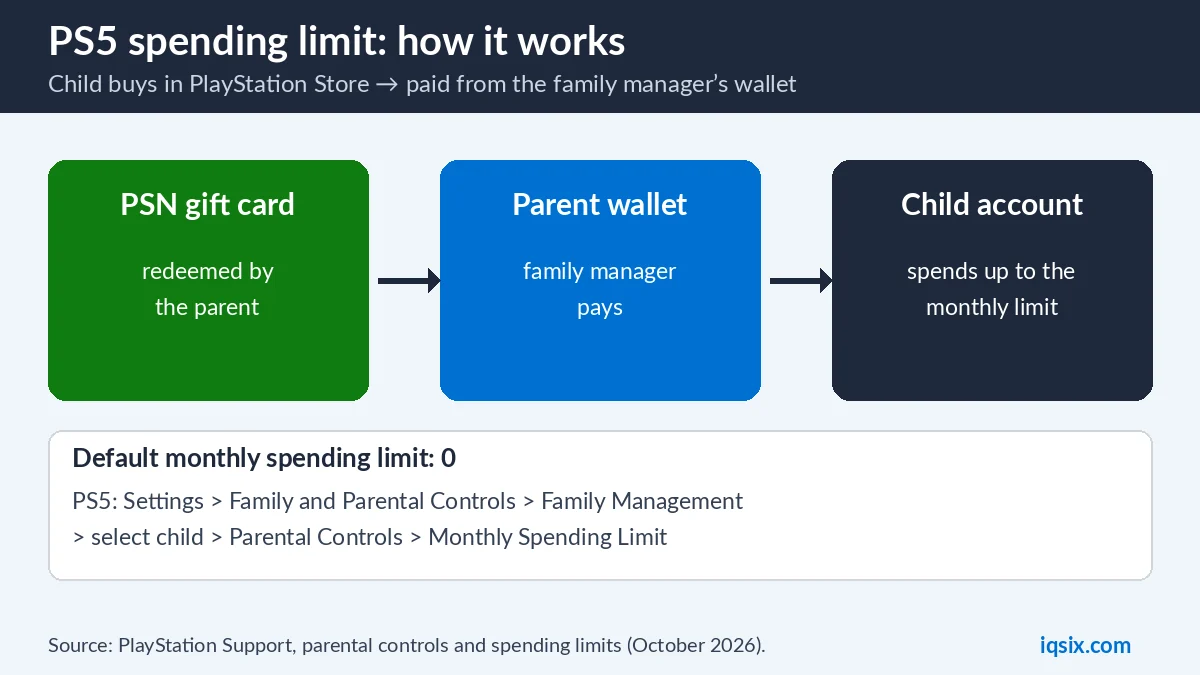
PlayStation says that when your child buys content from PlayStation Store on their account, payment is taken from the family manager’s wallet (PlayStation Support). As the family manager, parent or guardian, you decide how much your child may spend each month.
By default, the monthly spending limit is set to 0. So if your child should be able to buy games or add-ons on their own account, you need to change this setting. If they should not buy anything without asking, simply leave it at 0.
Before you can set any parental control, you need to create a family on PlayStation and add your child as a family member.
Before you start: roles in a PlayStation family
- Family manager: the adult who created the family. Child purchases are paid from this person’s wallet.
- Parents and guardians: adults the family manager appoints. They can also manage parental controls, including spending limits.
- Child family members: the children’s accounts, with the limits you set.
Because parental controls are tied to accounts, not to one console, the limit you set follows your child to every PS5 or PS4 they sign in on, at home or at a friend’s house. Setting up a controller for your child too? See how to connect a PS4 controller.
Why the 0 default is a good start
Starting at 0 means your child cannot buy anything until you decide. Many parents keep it at 0 and buy items together, or raise the limit only for a birthday or a holiday. Talk with your child about what the money is for, and agree on a monthly amount before you change the setting. That way the limit feels fair instead of like a punishment.
How to set a PS5 spending limit on the console
- Sign in to the PS5 as the family manager.
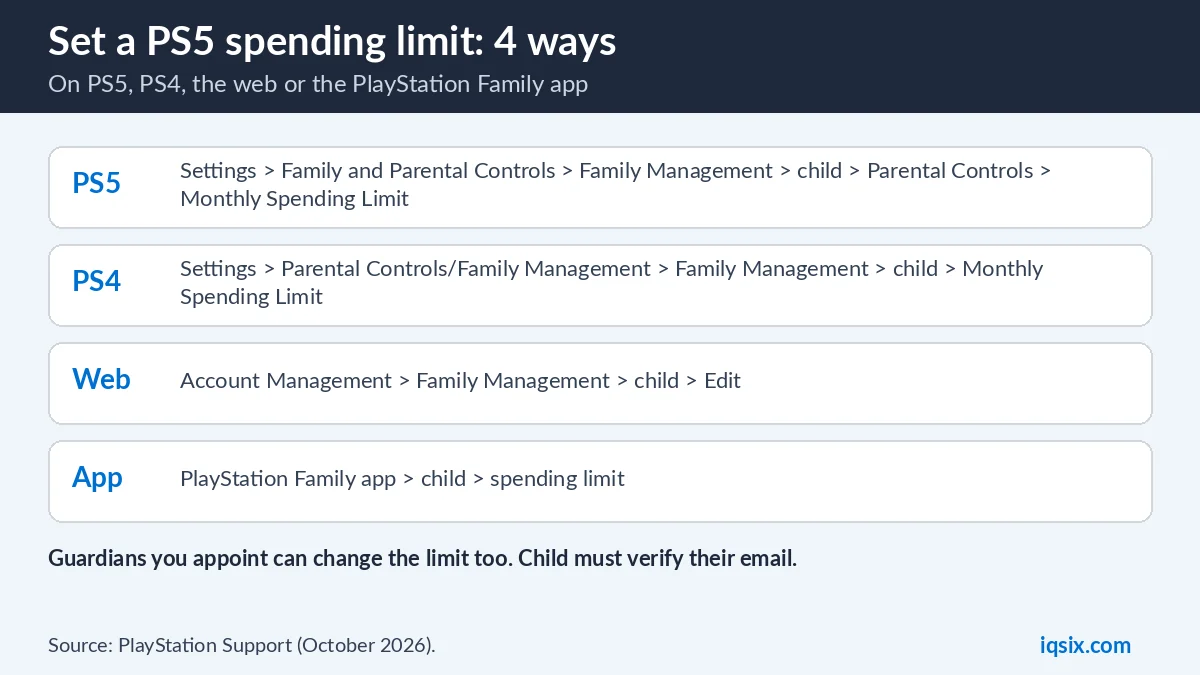
- Go to Settings > Family and Parental Controls > Family Management.
- Select your child.
- Select Parental Controls > Monthly Spending Limit and choose the amount.
On PS4
- Go to Settings > Parental Controls/Family Management > Family Management.
- Re-enter your account password if asked.
- Select your child, then Applications/Devices/Network Features > Monthly Spending Limit.
On the web or in the PlayStation Family app
On a computer, sign in to Account Management, select Family Management, choose your child and select Edit to change the Monthly Spending Limit.
On your phone, the PlayStation Family app lets you manage your child’s spending limit and other parental controls from anywhere.
Using PSN gift cards to control the budget
Because a child’s purchases are paid from the family manager’s wallet, the wallet balance is the real ceiling. Many parents do this:
- Set a monthly spending limit that matches your budget, for example $20.
- Add funds to your wallet with a PSN gift card instead of saving a credit card. Our guide on how to redeem a PSN gift card shows the steps.
- If no credit card or PayPal is saved on your account, nothing more can be bought once the card money is used up.
Our PSN redeem guide also explains that on a child account, the family manager usually has to redeem wallet codes on their own account. So keep the code yourself and redeem it on the parent account.
Other parental controls worth setting
The spending limit works alongside the other parental controls. From the same Family Management menu you can set:
- Age level for games and for Blu-ray and DVD videos.
- Playtime settings to limit how long and when your child can play.
- Communication and user-generated content restrictions.
- Web browsing and PlayStation VR use (Sony says PS VR and PS VR2 are not for children under 12).
PlayStation notes that parental controls are tied to accounts, so a change on one device applies on the others too. If you change a setting while your child is playing, they need to sign out and back in. Your child should also have completed email verification for the controls to work.
When your child asks for a game
If your child tries to start a game that is blocked by the age level, they can send you a request. You, as the family manager, and any appointed parent or guardian get a notification and an email. You can then allow the game in the PlayStation Family app, on the website from the email, or on the PS5.
Spending limit not working? Check these
- Email verification: PlayStation says your child must have completed email verification for parental controls to work.
- Sign out and in: if you changed a setting while your child was playing, they need to sign out and sign back in.
- Right child selected: check that you edited the correct child account in Family Management.
- Console settings: change your console settings so your child cannot change parental controls themselves.
- Guardians: another parent or guardian may have changed the limit.
Example monthly budgets
- $10 a month: a small add-on or in-game currency now and then. One $10 PSN card covers it.
- $20 a month: a cheaper game or a few add-ons. One $20 card.
- $50 every few months: a new full-price game for a birthday or good grades. One $50 card, with the limit raised for that month.
Setting the limit and the wallet balance to the same amount keeps it simple: your child knows exactly what they can spend, and you never get a surprise on your bank statement.
Teach kids to keep codes safe
Children are a common target of gift card scams in games and chats: someone promises free currency or items and asks for a code or a password. Explain that a gift card code works like cash and must never be shared, and that nobody from PlayStation will ask for it. Our guide on what is a gift card code has six simple safety rules you can go through together.
Who can change the limit?
The family manager, parents and guardians can manage parental controls. PlayStation adds a warning: if you are the family manager, anyone you appoint as a guardian can change the spending limits you created. And if you are a parent or guardian, tell the family manager when you change a limit.
PS Plus for children
Thinking about PS Plus so your child can play online? You can pay for it with wallet funds too. See PS Plus with a PSN gift card and PS Plus Essential vs Extra vs Premium to choose a plan.
Quick checklist for parents
- Create a family and add your child.
- Set the monthly spending limit (it starts at 0).
- Set the age level and playtime limits.
- Fund your wallet with a PSN gift card instead of a saved card.
- Keep gift card codes private and redeem them yourself.
- Install the PlayStation Family app to approve requests on the go.
Buy US PSN gift cards from IQSIX

IQSIX sells US PSN gift cards in $10, $20, $50 and $100 values – an easy way to give your child a fixed budget.
- Delivery: after your payment is confirmed, we send the code by email.
- Payment: crypto, card, or a Remitly bank or mobile money transfer at checkout.
- Region: US cards for US PlayStation accounts.
- Help: not sure which value fits your budget? Ask us on WhatsApp.
PS5 spending limit FAQ
How do I set a spending limit on PS5?
Go to Settings > Family and Parental Controls > Family Management, select your child, then Parental Controls > Monthly Spending Limit and choose the amount.
What is the default PS5 spending limit for a child?
PlayStation sets the monthly spending limit to 0 by default. Change it if your child should be able to buy content on their account.
Who pays when my child buys a game on PS5?
Payment is taken from the family manager’s wallet when a child buys content from PlayStation Store on their account.
Can I set the spending limit from my phone?
Yes. The PlayStation Family app lets you manage your child’s spending limit and other parental controls from your mobile device.
Can a guardian change the spending limit?
Yes. PlayStation warns that anyone the family manager appoints as a guardian can change the spending limits.
Is a PSN gift card a good way to control spending?
Yes. Funding the family manager’s wallet with a gift card instead of a saved credit card means nothing more can be bought once the card money is used.
Sources, checked 22 October 2026: PlayStation Support: parental controls and spending limits and PlayStation Family app.