
Short answer: the Activate Windows watermark means Windows is not activated on your PC. To remove the Activate Windows watermark, open Start > Settings > System > Activation, check the status and fix the cause: enter a valid product key, run the Activation troubleshooter after a hardware change, or install the Windows edition that matches your license. When Windows is activated, the watermark goes away.
This guide explains what the Activate Windows watermark means, its most common causes, five legitimate ways to remove it, why registry tricks and “activator” tools are a bad idea, and what to do if the watermark stays. The steps come from Microsoft Support, checked in October 2026.
- Meaning: Windows can’t confirm a valid license for this PC
- Check: Settings > System > Activation > Activation status
- Fix: activate with a product key or a digital license
- New motherboard? Use the Activation troubleshooter
- Avoid: activator tools and registry hacks
Table of Contents
What does the Activate Windows watermark mean?
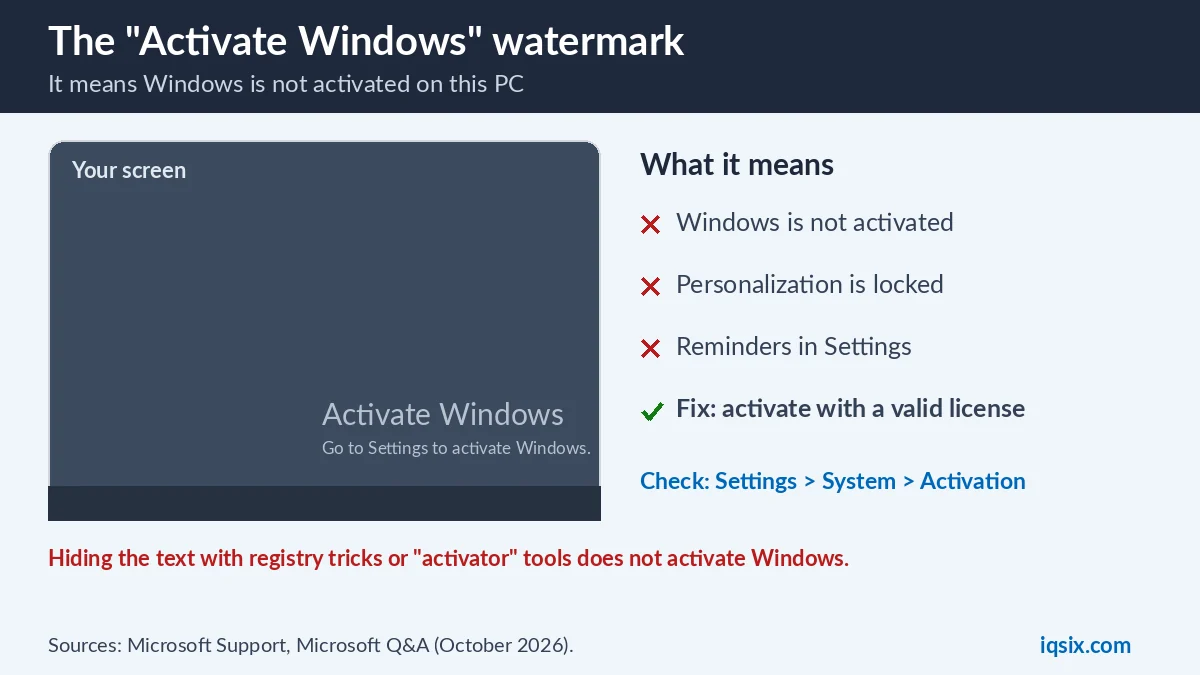
The Activate Windows watermark is the grey text “Activate Windows – Go to Settings to activate Windows.” in the bottom-right corner of the screen. Windows shows it when it cannot confirm a valid license for your PC. Microsoft explains that activation helps verify that your copy of Windows is genuine and hasn’t been used on more devices than the Microsoft Software License Terms allow (Microsoft Support).
An unactivated PC keeps working, but with limits. An answer on Microsoft Q&A lists them: the Activate Windows watermark, an activation message in Settings, no personalization settings and frequent notifications to activate Windows (Microsoft Q&A). In practice, you cannot change the wallpaper, theme or accent colors until Windows is activated.
So the watermark is not the problem itself. It is a reminder, and it only disappears for good when Windows is activated.
Why is Windows not activated? 6 common causes
The Activate Windows watermark always has a reason. These are the most common ones, based on Microsoft’s page Get help with Windows activation errors:
| Cause | What happened | Usual fix |
|---|---|---|
| No product key entered | Windows was installed with “I don’t have a product key” and never activated | Enter a valid key in Settings |
| New motherboard | Windows no longer finds a license that matches the device | Run the Activation troubleshooter |
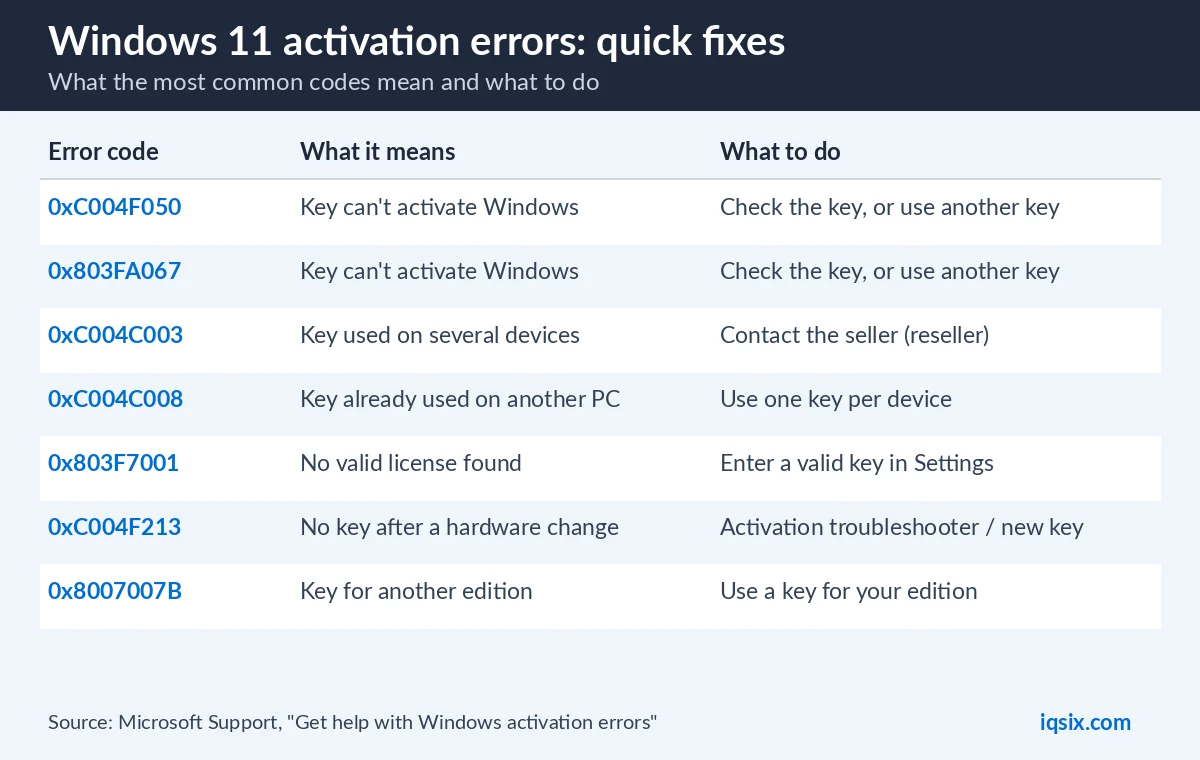
| Wrong edition | For example Pro installed, but the license is for Home (error 0xC004F212) | Install the matching edition or use a matching key |
| Key already used | The key is in use on another PC (error 0xC004C008) | One key per PC: contact the seller |
| Work or school PC | A volume license or a KMS server manages activation | Ask your IT administrator |
| Enterprise key on Home or Pro | Errors such as 0x8007232B or 0xC004F074 | Use a key for your edition |
The exact error code is shown on the Activation page. Look it up in our list of all Windows activation error codes, or see the most common ones in How to activate Windows 11 Pro with a product key:
How to check your activation status
Select Start, then Settings > System > Activation. Microsoft says your activation status is listed next to Activation status (Microsoft Support). If Windows is not activated, you see an error message explaining the failure, and Microsoft notes that you might need to purchase Windows 11 to activate.
The same page shows your edition, for example Windows 11 Home or Windows 11 Pro. Write it down: the edition matters for every fix below.
5 ways to remove the Activate Windows watermark
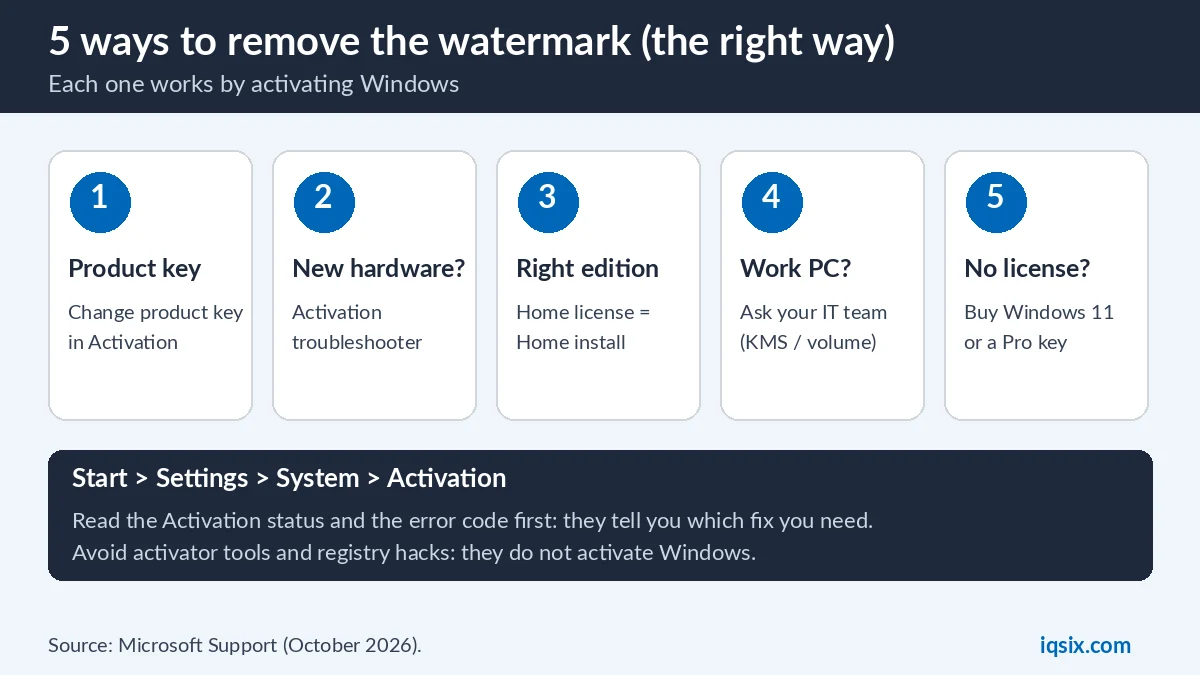
Each of these ways removes the Activate Windows watermark by activating Windows, which is the only real fix. Pick the one that matches your cause.
1. Enter a valid product key
- Open Start > Settings > System > Activation.
- Next to Change product key, select Change.
- Enter your 25-character product key and select Next.
- Check that the Activation status now shows that Windows is activated.
The key must match your edition: a Windows 11 Pro key activates Windows 11 Pro. Lost your key? See how to find your Windows product key. Full steps and error codes are in our Windows 11 Pro activation guide.
2. Reactivate after a hardware change
After a significant hardware change, such as a new motherboard, Windows may no longer be activated. If your digital license is linked to your Microsoft account, these are Microsoft’s steps (Reactivating Windows after a hardware change):
- Sign in to Windows as an administrator.
- Open Settings > System > Activation and select Troubleshoot.
- When the troubleshooter shows that Windows can’t be activated on your device, select I changed hardware on this device recently, then Next.
- Sign in with your Microsoft account.
- Select the check box next to This is the device I’m using right now, then select Activate.
Microsoft adds that the troubleshooter is only available while your copy of Windows isn’t activated, and that the edition (Home or Pro) must be the same before and after the change. If you used a product key, you can enter the same key again instead. If Windows came preinstalled on the PC and you replaced the motherboard, Microsoft says you may need to buy a new license.
Have a valid key but online activation fails after the change? Microsoft suggests activating by phone: type SLUI 04 in the search box on the taskbar, select it and follow the instructions. Phone activation is not available for Windows 11 Pro Education or Pro for Workstations.
3. Install the edition that matches your license
If Windows was reinstalled with the wrong edition, for example Pro on a PC licensed for Home, activation fails with an edition error such as 0xC004F212. Microsoft says the Activation troubleshooter can find a valid digital license for a different edition and give you instructions to install the correct edition. The other option is a product key for the edition you have installed.
4. Work or school PC: ask your IT team
Many company PCs use a volume license or a Key Management Service (KMS) server. Microsoft says activation is then usually managed by your organization, and a warning like “Your Windows License Will Expire Soon” can appear on such PCs (Microsoft). Some errors also appear when a work PC is away from the workplace network. Connect to your work network or contact your administrator.
5. Get a valid license
If the PC never had a license, you need one. Microsoft sells Windows 11 in the Microsoft Store, and product keys from shops are another option. A Windows 11 Pro key activates Windows 11 Pro. If your PC runs Windows 11 Home, Microsoft recommends activating Home first and then upgrading to Pro with the Pro key in Settings > System > Activation > Change product key (Microsoft). You can also install Windows 11 Pro and enter the Pro key during setup. Not sure which edition you need? See Windows 11 Home vs Pro.
Why you should not just hide the watermark
Search for the Activate Windows watermark and you will find registry edits, scripts and “activator” tools that promise to remove it in seconds. We do not recommend them:
- Hiding is not activating: tricks that only hide the text leave Windows not activated, so the locked settings and the reminders stay.
- Malware risk: unknown activation tools from random websites are a common way to get malware on your PC.
- License terms: activation is how Windows checks that your copy is used as the Microsoft Software License Terms allow (Microsoft).
A valid key costs less than fixing a PC after a bad download, and it removes the Activate Windows watermark the official way.
Activate Windows watermark still showing after activation?
First open Settings > System > Activation again. If the Activation status says that Windows is activated, restart the PC and check again. If the watermark is still there:
- Make sure the status shows that Windows is activated, not only that the key was accepted.
- Check the edition: a key for another edition does not activate this one.
- Run the Activation troubleshooter: Settings > System > Activation > Troubleshoot. On Windows 11 it is also in the Get Help app.
- Bought your key from IQSIX? Send a screenshot of the Activation page on WhatsApp and we help you.
How to keep the watermark from coming back
- Link your Microsoft account: Microsoft says it is essential to link your Microsoft account to the Windows 11 license on your device, so you can reactivate with the troubleshooter after a hardware change (Microsoft). Sign in to Windows with your Microsoft account in Settings > Accounts > Your info.
- Keep your product key: save the email with your key in a safe place.
- Keep the same edition: your license reactivates only if the edition stays the same, so reinstall Home on a Home PC and Pro on a Pro PC.
- Reinstalling? With a digital license, Microsoft says Windows 11 activates online automatically after the installation. Sign in with the Microsoft account linked to the license.
Activate Windows watermark on Windows 10
On Windows 10, the fixes are the same, but the Activation page is in Settings > Update & Security > Activation. Windows 10 support ended on 14 October 2025, so it is a good moment to upgrade Windows 10 to Windows 11 if your PC meets the Windows 11 requirements. The upgrade does not activate an unactivated copy: on Microsoft Q&A, the answer is that Windows 11 then runs with the same limitations, and you still need a license (Microsoft Q&A).
Get a Windows 11 Pro key from IQSIX

Need a license? IQSIX sells a Windows 11 Pro product key for one PC. Use it to activate Windows 11 Pro and remove the Activate Windows watermark the official way, in Settings.
- Delivery: by email after your payment is confirmed (or on WhatsApp if you ask).
- Activation: Settings > System > Activation > Change product key.
- Payment: crypto, card, or a Remitly bank or mobile money transfer at checkout.
- Help: not sure which edition you have? Ask us on WhatsApp or through our contact page before you buy.
Looking for Office or antivirus too? See all our software keys.
Activate Windows watermark FAQ
How do I remove the Activate Windows watermark?
Activate Windows. Open Settings > System > Activation, read the status and fix the cause: enter a valid product key, run the Activation troubleshooter after a hardware change, or install the edition that matches your license.
Why does my PC say Activate Windows?
Windows cannot confirm a valid license for this PC. Common causes are a missing product key, a new motherboard, the wrong edition, a key used on another PC, or a work PC whose activation is managed by an organization.
Can I use Windows without activating it?
Windows keeps working, but with limits: the Activate Windows watermark, an activation message in Settings, locked personalization settings and frequent reminders to activate.
Does the Activate Windows watermark go away on its own?
Only when Windows is activated. For example, if you reinstall Windows 11 on a PC with a digital license, Windows activates online automatically after the installation.
Will a registry edit remove the watermark?
Tricks that only hide the text do not activate Windows, so the other limits stay. Activate Windows with a valid license instead, and avoid activator tools, which can carry malware.
Will a Windows 11 Pro key remove the watermark on Windows 11 Home?
A Pro key activates Windows 11 Pro. Microsoft recommends activating Windows 11 Home first and then upgrading with the Pro key in Settings > System > Activation > Change product key. You can also install Windows 11 Pro and enter the Pro key during setup.
Sources, checked 26 October 2026: Microsoft Support: Activate Windows, Reactivating Windows after a hardware change, Get help with Windows activation errors, Upgrade Windows Home to Windows Pro and Microsoft Q&A. Windows menus can change after updates.